




When most people think of “phishing”, they usually think of users being tricked into disclosing credentials or downloading malware
One of the fastest growing methods of attack does neither. Instead, a targeted user is tricked into authorizing an attacker-controlled client. These attacks abuse user trust in the OAuth-based authorization flows used to grant an app access to data in another app.
In early 2026, device code phishing is surging. This attack exploits known weaknesses in the device code authentication grant - a method in which users authorize a client on one device by signing in on a separate device. This grant was intended to make it easier to sign in to devices that are “input-constrained” - where it is awkward to enter a password. But we also see it used for many other use cases, including workforce use cases. Threat actors have now appropriated this flow with striking success to trick users into authorizing their malicious applications.
Threat researchers at Push Security have observed a 15x increase in device code phishing attacks targeting Microsoft 365 users since the start of the year. Researchers from Okta Threat Intelligence and Proofpoint have now observed indications that some threat actors have pivoted from AitM phishing attacks to perform device code phishing attacks.
Device code phishing has taken center stage because attacks have been industrialized via “phishing as a service” operations such as EvilTokens.
EvilTokens provides a low-skilled cybercrime attacker with the infrastructure, lures, defence evasion tools and alerting/messaging required to launch device code phishing attacks against Microsoft customers at scale, and with minimal effort on the part of the user.
In this article, we’ll explain what the device code flow is used for, how it is exploited, and the conditions that make this form of attack “phishing with dynamite”.
The device code authorization grant
Device Code Phishing abuses a specific OAuth 2.0 authorization flow designed for input-constrained devices - the OAuth 2.0 Device Code Authorization Grant (RFC8628).
An input constrained device could be a streaming app on your TV, apps that run your household appliances, or even the entertainment systems in your car. In any system where it’s clumsy to type a long, strong password, the device code flow enables a user to sign in out-of-band on a mobile or laptop and authorize (consent) the client to access their account data.
If we used the idea of a streaming video app to illustrate:
A user wants to sign-in to a streaming app on their television
The user’s smartphone browser is the out-of-band authorizing device
an authorization server brokers access to back-end servers of the streaming service.
In a legitimate device code authorization flow:
- A user attempts to sign-in to their streaming service account from a TV.
- An app on the TV requests access from an authorization server by sending a Client ID in a request to a specified endpoint. The authorization server returns a device code, user code and verification URI.
- The app instructs the user to visit the verification URI - either presenting it as a web address or a QR code on the TV screen - and also supplies the user an eight character user code to enter on their smartphone to authorize the app.
- Upon visiting the supplied web address, the user is prompted to enter the user code and is asked to verify their identity. The user may optionally be asked to consent to granting the app access to server-hosted resources (account data in the streaming service).
- In the background, the app continually polls the authorization server in requests that include the Client ID and the device code. The client app is effectively asking the authorization server whether the user has authorized it. Once the user consents, the authorization server responds to a poll request with an access token. That access token can then be used to make API calls to the streaming service.
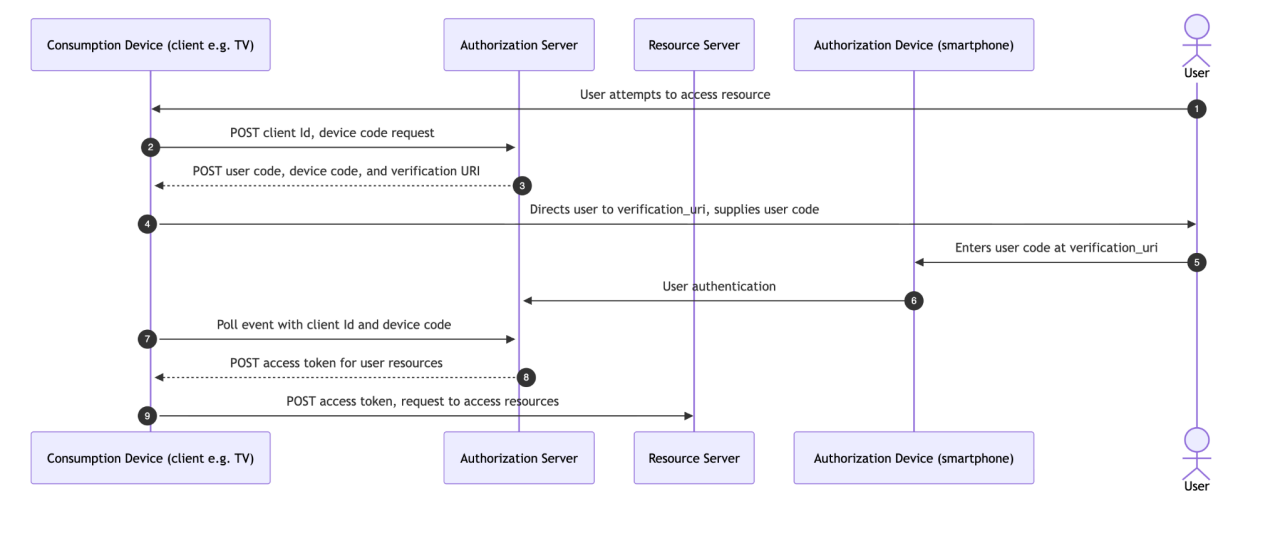 Figure 1: OAuth 2.0 Device Code Authorization Flow
All of these interactions happen in a few seconds. The flow is both convenient and it encourages the use of stronger methods of authentication (especially when compared to short passwords and OTPs being entered into input-constrained devices).
Unfortunately, the device code flow is also prone to abuse in social engineering attacks.
Device code phishing
In a device code phishing attack, by contrast, the attacker controls the client app:
- The attacker either registers a new app in an attacker-controlled tenant, or uses a Client ID known to be trusted by the authorization server of the targeted user. Requests to the authorization server are treated as valid because the device code authorization flow does not require that the client app is authenticated or even registered with the authorization server. There is nothing to stop an attacker abusing a known Client ID, and Client IDs are not typically protected as secrets.
- The attacker supplies the user code and verification URI to a targeted user via a phishing site or over the phone via a social engineering call. If the authenticated user visits this web address and enters the user code, they will effectively grant the attacker’s app access to their resources. The attacker simply needs to poll the authorization server and will receive an access token in response.
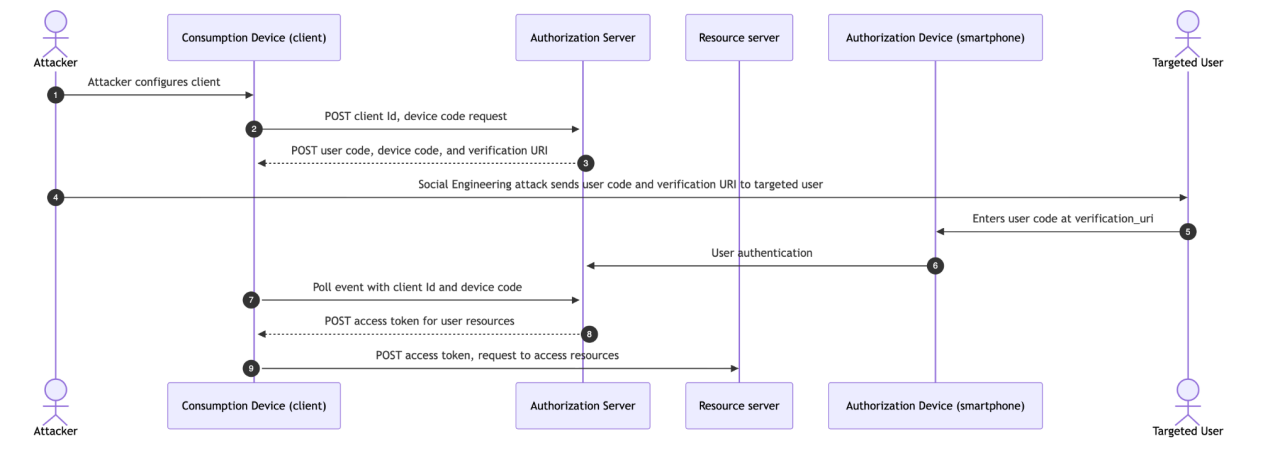 Figure 2. Device Code Phishing
Phishing with dynamite
In attacks we have observed to date, attackers have shown interest in impersonating clients that:
Are authorized by one common authorization server,
Are assigned to all users by default in new tenants (including free/trial tenants)
Have a known/common Client ID that is the same in every tenant
Unfortunately, Microsoft apps meet this criteria on several fronts:
An EvilTokens user can start a device code flow by sending a POST request to the same common endpoint that is applicable to every Microsoft customer (/common/oauth2/devicecode).
This POST request has to include a legitimate Client Id. The Client Ids of first-party apps that are available by default in Microsoft tenants are routinely listed and tabled and the odd relationships between them are discussed openly. Threat researchers noted that by default EvilTokens abuses the known Client ID of Microsoft Office, but other researchers have observed abuse of additional Microsoft apps.
This means that a single tool is useful for attacking just about every Microsoft customer on the planet - irrespective of whether it’s a teen authorizing an app on his XBox or an IT manager authorizing an app for a Fortune500 company.
The upside for an attacker of all users authenticating via a single domain (login.microsoft.com) is that it’s very easy to attack at scale. In a device code phishing attack on Microsoft customers, attackers direct all targeted users to a common endpoint (login.microsoft.com/common/oauth2/v2.0/devicecode). At that endpoint, any user of Microsoft services is a valid user, especially when using Client IDs that many or all users are likely to be assigned.
By contrast, the Okta platform was designed around the principle that every organization has its own independent and decentralized authorization server(s). There is no concept of a “common” endpoint where users from different organizations verify their identity at one location.
This means that while clients created in Okta are not immune to device code phishing attacks, Okta’s architecture forces attackers to do a lot more homework on any potential target.

Resources
Get the full story
To learn more about Okta’s approach to defending against abuse of the device code flow, the security contacts of Okta customers can sign in to access an extended version of this article at security.okta.com
Recommendations
- Only allow the use of the device code flow by exception. Microsoft customers should implement a Conditional Access Policy that blocks all access using the device code flow.
Where the device code flow is deemed the most appropriate for a client application created in Okta:
allowlist the IP range from which a token for a given client can be issued. This can be configured for any given client at Applications > General > Network IP. When configured, requests for an access token from an attacker-controlled client outside the allowlisted IP range will be denied.
Monitor for anomalous token requests and user grants.


