




The Okta Workflows team released several new capabilities to help you build identity automation.
In this release:
- Duplicate a card
- New Greenhouse, BambooHR, and Darwinbox connectors
- New templates
- Okta Workflows resources
Duplicate a card
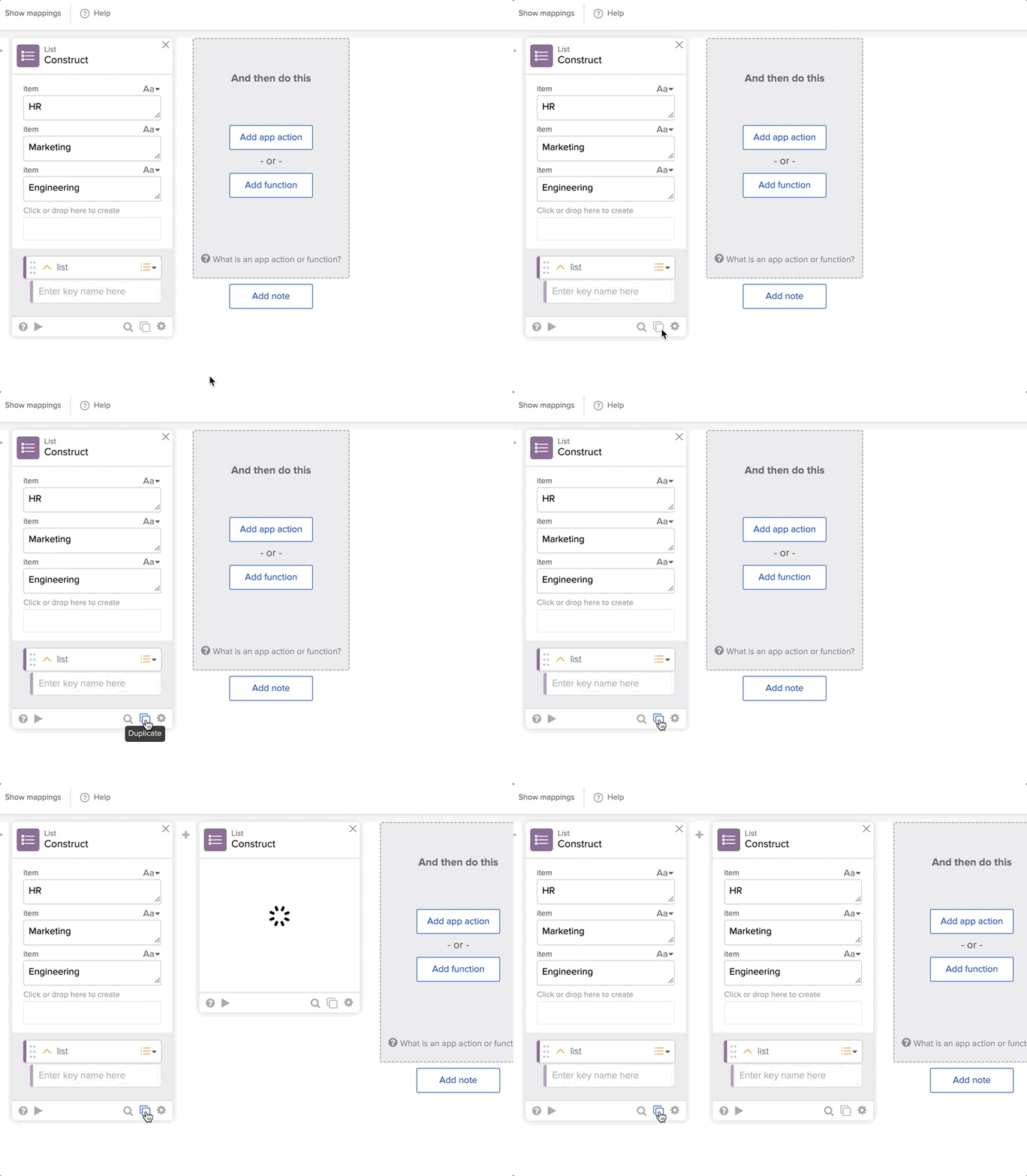
The duplicate card option creates an exact replica of an existing card in your flow. This is helpful when creating flows that require multiple similar cards – for example, long flows with repeated functions or flows with branching.
Click the duplicate card icon at the bottom of a card to duplicate it:
New features
There are two more new features:
- OAuth Scopes Customization feature.
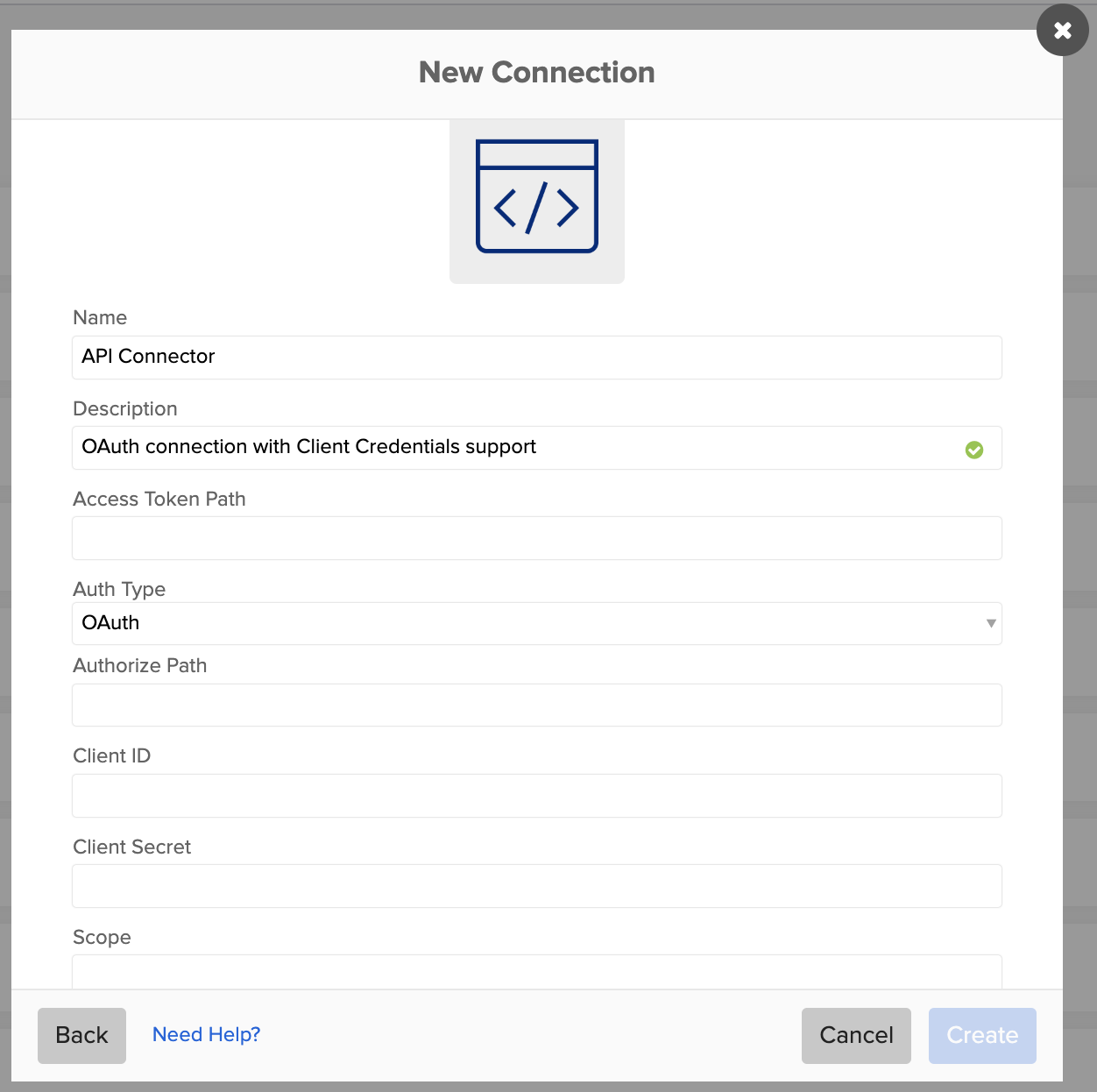
- The API Connector has Client Credentials support.
OAuth Scopes Customization feature
When an Okta Workflows user (automation builder) authenticates to a connector using the OAuth 2.0 protocol, they must grant permissions for all OAuth scopes associated with the connector, regardless of whether those scopes are necessary for a specific use case. This approach often results in the creation of overly permissive connections.
When a connector supports the OAuth Scope Customization feature, users gain the flexibility to create connections tailored to their specific needs. They can limit flows to only essential actions required in a third-party application, minimizing the risk associated with overly permissive connections.
The API Connector has Client Credentials support
The API Connector function cards now support authentication using OAuth 2.0 Client Credentials.
New connectors
There are several new connectors.
- Greenhouse connector.
- BambooHR connector.
- Darwinbox connector.
Greenhouse connector
Greenhouse is a hiring software platform that helps recruitment with tools for attracting talent, conducting interviews, and making data-driven decisions.
The Greenhouse connector has the following actions:
| Action | Description |
|---|---|
| Add User Email Address | Creates an unverified email address for the specified user in Greenhouse. |
| List Candidates | List all of an organization’s candidates who are currently in Greenhouse. |
| List Users | List all of an organization’s users who are currently in Greenhouse. |
| Read Candidate | Retrieve a candidate’s information in Greenhouse. |
| Read User | Retrieve the information for a specific user in Greenhouse. |
| Update Candidate | Edit a candidate’s basic information in Greenhouse. |
| Update User | Edit a user’s basic information in Greenhouse. |
BambooHR connector
The BambooHR connector provides the ability to manage employees.
| Action | Description |
|---|---|
| List Employees | Retrieve a list of employees in BambooHR. |
| Read Employee | Read BambooHR information about a specific employee. |
| Update Employee | Update an employee’s fields in BambooHR. |
Darwinbox connector
Darwinbox is an end-to-end HR Technology solution that helps enterprises simplify HR across the entire employee lifecycle. Darwinbox is a third-party connector that was built by Darwinbox.
| Action | Description |
|---|---|
| Update Email ID | Updates a user’s email address in Darwinbox. |
| Update User Attributes | Fetches an HR update from Darwinbox. |
Select Add app action from a flow to use these and other connectors.
New templates
There are several new templates.
| Template | Description |
|---|---|
| Examples of OpenAI prompts | Discover the potential of artificial intelligence with practical example prompts to help guide you through automating tasks, generating creative content, and more. |
| Enable a grace period for Identity Governance Access Certification | During an access certification, some organizations might allow for revoke decisions. Some campaigns implement a grace period where end users retain access to the resource before their access is revoked. |
| Get an Atlassian ID | Many actions supported within the Jira connector, such as creating or assigning user issues, require an Atlassian ID. You can use this helper flow to find a user’s Atlassian ID when necessary. |
| Identify inactive third-party users | Identifying inactive users of SaaS applications managed within Okta allows for maintaining the principle of least privilege. |
| Implement log streaming with Okta Workflows | This template focuses on implementing log streaming and Okta Workflows to capture specific event types from the Okta System Log. Log streaming enables the export of System Log events in near real-time to platforms like Amazon EventBridge or Splunk Cloud. You can use this functionality to monitor suspicious activity, automate responses to specific events, or troubleshoot. |
| Offboard Google Workspace users | This template shows how to perform several tasks in Google Workspace when offboarding a target user. |
| Workflows tutorials | The Okta Workflows tutorials template is a comprehensive guide designed to help you experience Okta Workflows. This resource demonstrates the automation capabilities of flows to both beginners and advanced users. Integrating this template into your Okta preview organization gives you access to sample users and a suite of flows showing the versatility and efficiency of Okta Workflows. |
Go to the Templates page in Workflows to try these and other templates.
Okta Workflows resources
- Get help from Workflows specialists during weekly community office hours.
- Learn from Workflows videos.
- Get help from support: discuss a Workflows topic or ask a question.
- Get help from the community: join the #okta-workflows channel on MacAdmins Slack.


