






Why is Biometric Authentication Important?
Organizations seeking to elevate their security posture often find that having more granular control over the authentication experience allows them to better align with specific identity assurance goals. With this feature, Okta introduces a way for administrators to specifically mandate biometric assertion within Okta Verify, ensuring that device biometrics must be used to satisfy authentication policies. Administrators can now define application-level sign-on policies, empowering them to enforce distinct security controls for different applications. This refined level of control ensures that organizations can confidently uphold their security standards while simultaneously creating a faster and smoother login experience for users.
Prioritizing User Experience with Inline Remediation
What about users who don't have biometrics set up on their devices? In addition to the ability to enforce biometrics, we are also enhancing the user experience for scenarios where a policy requires biometrics, but the user is not yet enrolled. In the past, this mismatch often resulted in the below "dead-end" error screen, forcing users to abandon their login or contact IT for support.
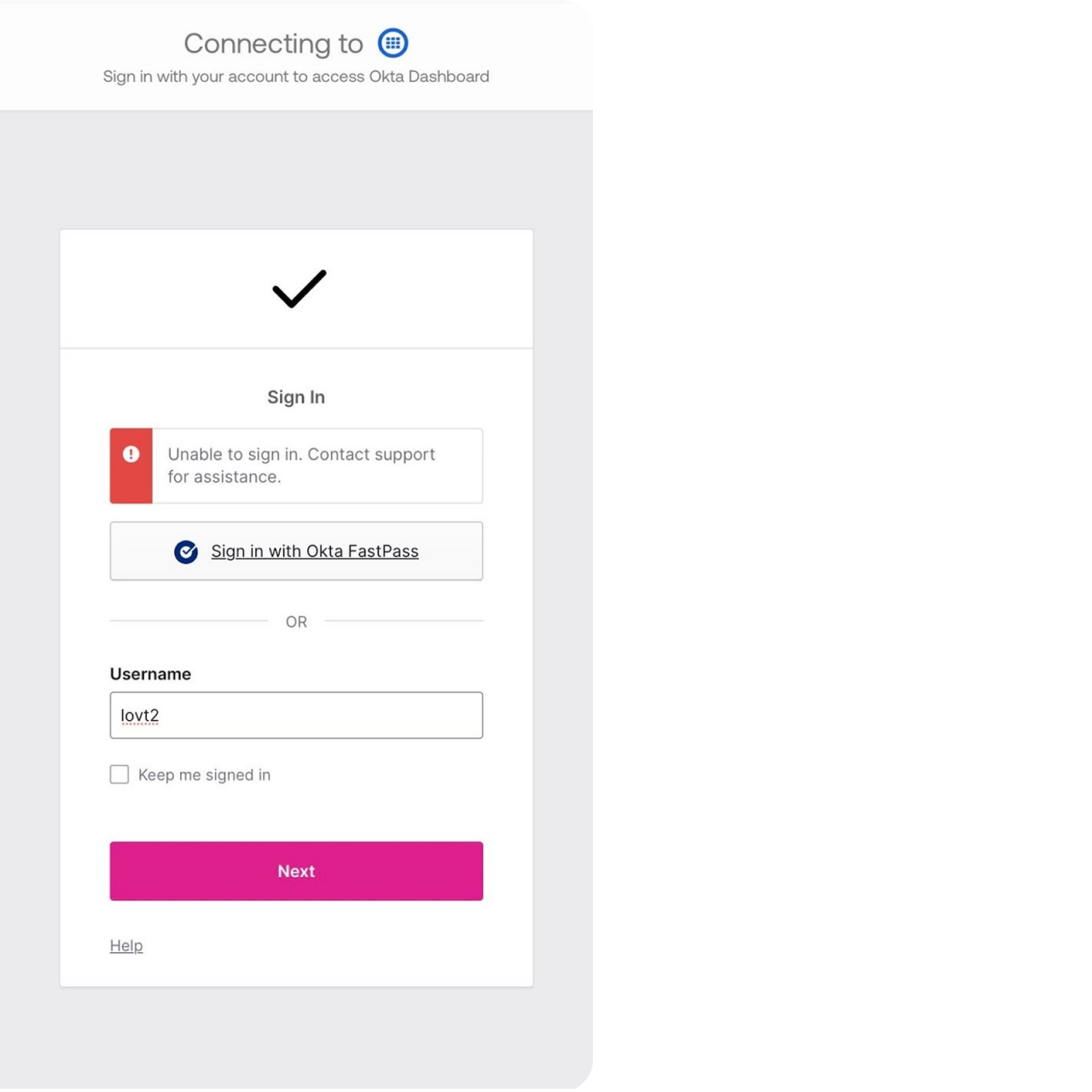
The Inline User Verification Remediation feature was developed to address this exact issue. Instead of showing an error message, Okta Verify now guides the user through an inline enrollment process to add the required biometric keys to their existing enrollment. The user can then immediately use these newly added keys to satisfy the original authentication challenge in a single, unified flow.

Step | User Action & System Response
- The user attempts to log in to their Okta dashboard.
- When prompted for an authentication factor, the user selects Okta Verify Push.
- The Application Sign-On Policy challenges the user for biometric verification, but the system detects that the user has not yet enrolled in biometrics.
- Instead of an error, the Biometric Remediation Flow is triggered within Okta Verify.
- The user is guided by the UI to complete the biometric enrollment process on their device. Once enrolled, they are returned to the authentication request.
- Okta Verify challenges the user for biometric verification again.
- The user successfully provides their newly enrolled biometrics and gains access to their application.
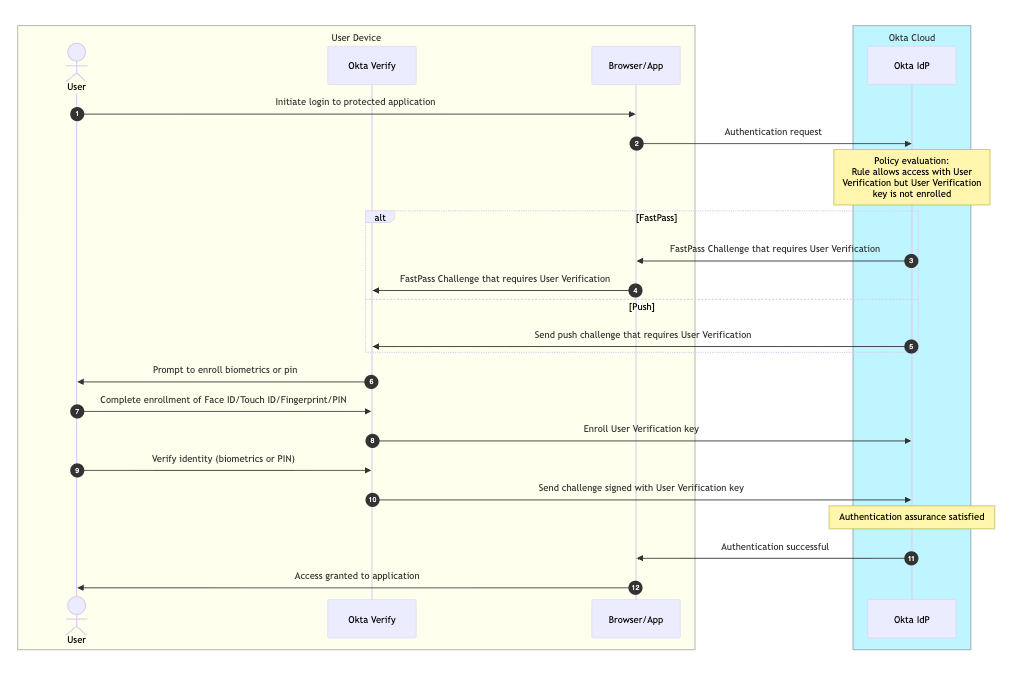
Technical Deep Dive: Inline Remediation Workflow Design
- Starting the Sign-In Journey: The process begins the moment a user tries to log in. The system first identifies who the user is—either by their username, email, or a specialized ID—and then asks for their password or other initial credentials to kick off the request.
- Behind-the-Scenes Security Check: Once the user submits their information, the "Okta Cloud" acts as a digital security guard. It looks at several factors at once: who the user is, what group they belong to, their physical location (IP address), and even the specific device they are using. It also checks if the request looks risky based on previous behavior.
- Automatic Policy Matching: The system then automatically compares the user’s situation against the specific rules set by the organization's administrator. It searches through a "library" of rules to find the one that perfectly matches the user’s current login attempt.
- The Final Decision: Access or Denial: Based on those rules, the system makes an instant decision. If the login meets all the organization's safety requirements, the user is granted access. If something doesn't look right—such as an unrecognized device or a high-risk location—the system will deny access to keep the account safe.
- Policy Evaluation: The process begins when the system evaluates the organization’s authentication policy during a login attempt.
- Gap Detection: If the administrator requires biometric assertion but the user has not yet set it up, the system identifies the user's current status as "unsatisfiable".
- Triggering Remediation: Instead of a simple denial, the system initiates an inline remediation flow through the Okta Verify app on the user's device.
- Real-Time Enrollment: The user is presented with a prompt to enroll their biometrics immediately, allowing them to fulfill the requirement without leaving the login journey.
- Dynamic Re-Evaluation: Once the setup is complete, the system automatically re-evaluates the user's assurance level to confirm it now meets the policy.
- Successful Access: After the biometric factor is successfully verified, the system grants the user access to their application, ensuring a smooth experience for the user and a secure outcome for the administrator.
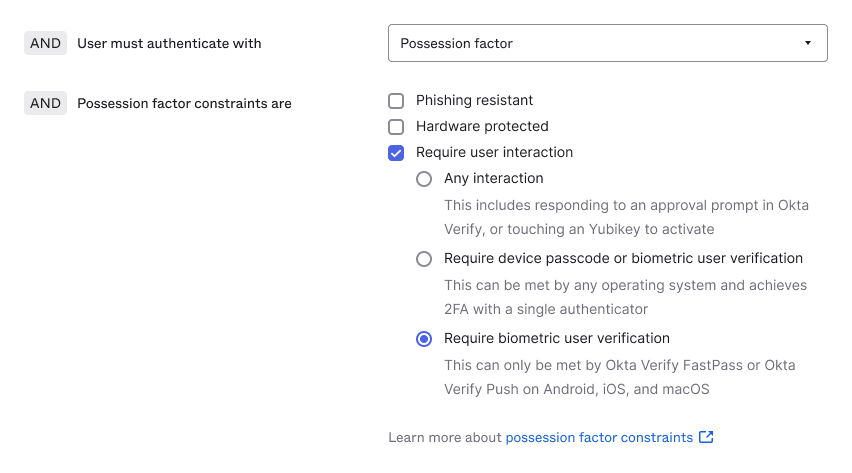
For administrators, enabling this enhanced security is straightforward. You can enforce biometric verification by setting up an application sign-on policy. When this policy is active, users will be challenged for biometric verification. If the user has no enrolled biometrics, the user will be prompted for biometric inline remediation flow.
Step | Action
- Navigate to your Authentication Policy settings.
- Go to the rule requirements and find Possession factor constraints.
- Check the box for Require user interaction.
- Select the option Require biometric user verification.
- Save the rule to apply the changes.
Key Takeaways
With the new Inline Remediation feature, Okta provides a seamless solution that intelligently guides users through biometric enrollment when it's needed. This not only eliminates disruptive, dead-end errors but also empowers administrators to confidently enforce stronger authentication policies. Okta ensures a perfect balance between robust security and a frictionless user journey, making secure access easier and more intuitive for everyone.
Have questions about this blog post? Reach out to us at eng_blogs@okta.com.
Explore more insightful Engineering Blogs from Okta to expand your knowledge.
Ready to join our passionate team of exceptional engineers? Visit our career page.
Unlock the potential of modern and sophisticated identity management for your organization. Contact Sales for more information.
These materials are intended for general informational purposes only and are not intended to be legal, privacy, security, compliance, or business advice. © 2026 Okta, Inc. and its affiliates.


