






TL;DR
Okta Policy Branches is a Git-style change management feature for Okta application sign-in policies. It allows IT administrators to branch, test, and monitor changes to authentication policy rules against real production traffic for up to 28 days without impacting the end-user experience, enabling data-backed policy promotion and one-click rollbacks.
Every authentication policy change is a bet. You tighten a rule to improve security, but you can't see who it will lock out until it's live. The result? Admins leave risky gaps in place because the cost of breaking sign-ins — the flood of help desk tickets, the executive who can't sign in, the contractor cut off mid-project — feels worse than the risk they're trying to fix.
Policy Branches brings Git-style change management to Okta app sign-in policies. Branch your policy, monitor it against real traffic without affecting users, and promote only when you have the data to back the decision. If something goes wrong, restore with one click.
No more guessing. No more fear tax.
Why should IT teams use Policy Branches for Okta authentication policies?
If you manage Okta authentication policies, you've felt this tension: security teams want tighter controls, but every change carries an invisible blast radius. You don't know which users will fail, which devices won't comply, or which offices are outside the new network zone. You don't find out until the tickets start rolling in.
Key deployment insights
Policy Branches limits that blind spot. You get production-grade answers to questions like:
- Phishing-resistant MFA: How many users would be blocked if phishing-resistant multi-factor authentication (MFA) is required tomorrow?
- Device posture compliance: Which devices don't meet the new posture requirements I'm about to enforce?
- Network boundary validation: Who regularly signs in from outside the network zones I want to restrict to?
- Risk control: Would a risk-score rule actually fire on real traffic, or is it inert?
- AI agent authentication: These insights aren’t limited to human users. If you're using Okta for AI Agents, Policy Branches let you preview how changes to app sign-in policies affect both user and agent authentication flows before they go live.
You answer these questions with data from your actual sign-in traffic. Not a staging environment. Not a spreadsheet estimate.
Comparison: Live enforcement vs. monitored branch
| Functionality | Live policy enforcement | Monitored policy branch |
|---|---|---|
| User impact | Real-time challenges, blocks, or access grants | Zero impact (passive evaluation in the background) |
| System Log identification | Standard policy.evaluate_sign_on events | Tagged with AlternateId authentication policy branch in the policy.evaluate_sign_on event |
| Evaluation window | Continuous | Up to 28 days of continuous traffic monitoring |
| Dashboard display | Solid trend lines in Policy Insights | Dashed trend lines in Policy Insights |
| Rollback capability | Requires manual policy reconstruction | One-click restore to any one of the last five live configurations |
The step-by-step Okta Policy Branches workflow: Branch, monitor, promote, restore
The workflow will feel familiar if you've ever used Git branches:
- Branch: Create a draft copy of your live app sign-in policy. Edit it freely. Nothing is enforced; your users are unaffected.
- Monitor: Turn on monitoring, and Okta evaluates the branch against your real sign-in traffic for up to 28 days. No user is ever challenged or blocked by the branch. Okta simply logs what would have happened (such as access denials, additional challenges, and the specific rule that was matched) and rolls the results into the Policy Insights Dashboard.
- Promote: When monitoring gives you enough confidence, promote to live with one click. The existing live configuration is automatically saved to the branch history.
- Drift: If the existing live policy was updated after a branch was created, a warning alerts the admin to potential drift from the branch source.
- Restore: Changed your mind? The last five live configurations are stored in branch history, ready for a one-click restore: no reconstruction, no spreadsheet, and no maintenance window.
What access management scenarios can you test using Policy Branches?
Rolling out phishing-resistant MFA
The dashboard shows how many sign-ins would have been challenged for a phishing-resistant factor, how many would have satisfied that challenge with an already-enrolled authenticator, and how many would have hit a dead end with no path to comply. That gap is your enrollment campaign, not an incident.
Raising device posture requirements
Monitor a branch that requires stricter device assurance policies or a specific endpoint detection and response (EDR) signal. The System Log shows sign-ins that would have been denied under the new rule. Size the population of non-compliant devices before you enforce, and address them proactively.
Restricting access by IP zone
Add or tighten a network-zone condition on a branch, monitor for two weeks, and see exactly which real users sign in from outside the allowed zones by watching the matched rules. Catch the field team, the VPN edge case, and the third-party contractor before they show up in a ticket.
Acting on risk scores
Add a rule that denies or challenges sign-ins above a risk-score threshold. Monitor to see how often the rule would actually fire, on whom, and under what conditions. Tune the threshold with data instead of intuition, and confirm the rule isn't inert before you rely on it.
All monitored evaluations are tagged in the System Log (look for the target with the AlternateId set to authentication policy branch in the policy.evaluate_sign_on event), so they're distinguishable from live enforcement and flow to your existing log streams unchanged.
Those same events power the Policy Insights Dashboard, where branch results appear alongside your live policy data. The dashboard provides a side-by-side comparison: live policy results are shown as solid trend lines, and monitored branch results are shown as dashed lines. You can instantly see the percentage differences in access denials, additional challenges, and rule matches between what's enforced today and what you're considering.
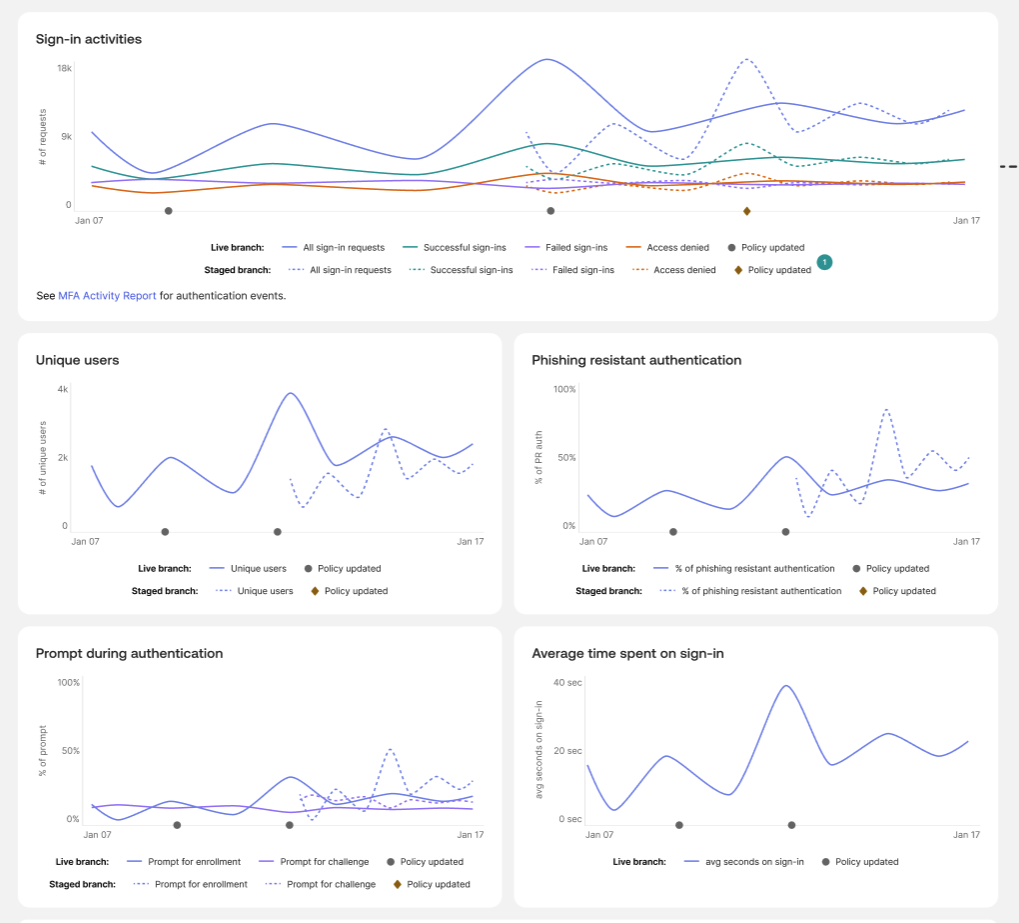 Policy Branch monitoring in the Policy Dashboard
How to get started with Okta Policy Branches
Policy Branches is a self-service Early Access feature for app sign-in policies.
- In your Okta Admin Console, navigate to Settings > Features > Change management to app sign-in policies
- Enable the feature toggle
- Open any app sign-in policy and select Create branch
- Enable monitoring to immediately begin logging branch evaluations directly in your System Log and populating the Policy Insights Dashboard
For the full walkthrough, see our documentation on how to manage app sign-in policy branches.
Make your next policy change with confidence. Branch it first.
*Any mention in this article of solutions, features, functionalities, certifications, authorizations, or attestations that are not currently generally available or have not yet been obtained may not be delivered or obtained on time or at all. We assume no obligation to deliver on such items and you should not rely on them to make your purchase decisions.


