






Key product highlights
Unified agent discovery: Centralizes agent visibility across platforms like Cursor, Databricks, and Workato into a single registry.
Automated credential management: Uses CIMD standards to eliminate manual client secrets and automate credential rotation.
Streamlined MCP governance: Secures connections to cataloged and custom MCP servers using DCR and single-policy authorization.
What’s new in Okta for AI Agents: Simpler onboarding and MCP connectivity across more platforms
Okta for AI Agents has added new capabilities that help organizations discover and onboard AI agents from more platforms, register them with less manual work, and more easily govern how they connect to Model Context Protocol (MCP) servers.
- Bring agents from more builder platforms into view: Additional AI Agent Import integrations bring agent identities from platforms like Cursor, Snowflake, Databricks, Workato, and Tines into a centralized registry, so you can see and govern them in one place instead of hunting across multiple tools.
- Register agents without manual credential work: AI Agent Registration with Client ID Metadata Document (CIMD) lets agents register through a vendor-hosted metadata URL, so admins don't have to handle credentials manually. Credentials rotate automatically, and each agent gets a record with the details your organization needs to track. Multi-Source Agent Schema lets you add custom fields to each agent's registration record, such as an agent's purpose or whether it runs in production. Okta pulls in details from the platform where each agent was built.
- Connect to MCP servers without a new setup project every time: The Okta Integration Network MCP Server Catalog and MCP Server Registration with Dynamic Client Registration (DCR) help you set up and connect to cataloged and custom MCP servers in just a few steps. Multi-MCP Custom Auth Servers places multiple custom servers behind a single authorization server, rather than configuring them one at a time.
Agent growth demands a simpler way to register and connect them to AI tools
Gartner® predicts that "by 2028, an average global Fortune 500 enterprise will have over 150,000 agents in use," yet, "only 13% of organizations think they have the right AI agent governance in place."*
Security teams are struggling to keep track of agents across platforms, record the right details for each one (such as owner, purpose, or data classification), and govern which MCP servers they can reach. Every new agent makes that harder. AI teams, meanwhile, can't afford to wait on registration and setup before their agents can do real work.
That is the gap: Agents are being adopted quickly, but registering and connecting them to AI tools is still slow and manual. The latest release of Okta for AI Agents closes this gap. Okta for AI Agents now makes it easier to register agents and connect them to MCP servers at scale—bringing in agents from more builder platforms, adding the governance details you need for each one, and cutting the manual credential work and per-server setup that slow every rollout.
Registering agents and securing their connections are usually separate projects, each with its own tools. Okta makes them one, built on the identity layer that leading enterprises already trust for their people and applications. The capabilities in this release focus on two of the four critical questions from the Blueprint Alliance’s blueprint for the secure agentic enterprise:
- Where are my agents?
- What can they do?
Where are my agents?
First, let’s start with: Where are my agents? Seeing your agents is the first step in governing them. You need one view of every agent across platforms, with the right details attached, and historically, every new agent has meant another manual registration to track down.
Directly import agents from more platforms your teams are already using
Agents don't wait for IT to approve them. They show up wherever your teams already work. A developer spins up an agent inside Cursor to automate code review on pull requests.
Someone in data analytics builds one in Snowflake to query enterprise data warehouses. Another team builds an agent in Databricks to answer questions about internal data.
AI Agent Import integrations already support importing agents from common platforms like Salesforce Agentforce, Amazon Bedrock AgentCore, AWS IAM Identity Center, and more. This now extends to Cursor, Snowflake, Databricks, Workato, and Tines, so they all appear in a single centralized registry. Okta records where each agent came from, lets you assign an owner, and updates existing records during later imports instead of requiring you to register agents again. This approach is vendor-agnostic. Your teams can choose whichever agent fits the job, and the registry helps maintain a comprehensive view across the various platforms they are actually using.
Capture the agent metadata your organization actually needs to know
Once an agent is imported, the next question is what you actually know about it. A generic name and ID alone rarely answer that. For example, a financial services customer might need to track which business unit owns a given agent and what data classification it's cleared to reach, as that determines what compliance review it's subject to. A healthcare customer might need to record which clinical system an agent was built to support so that an auditor can trace every agent back to a specific use case.
Multi-Source Agent Schema (in General Availability) lets you add that level of detail to any agent record, such as an agent's purpose or risk level. It retains the details from each agent's source platform and maps them to shared fields, so you can uniformly define and govern every agent, wherever it was built.
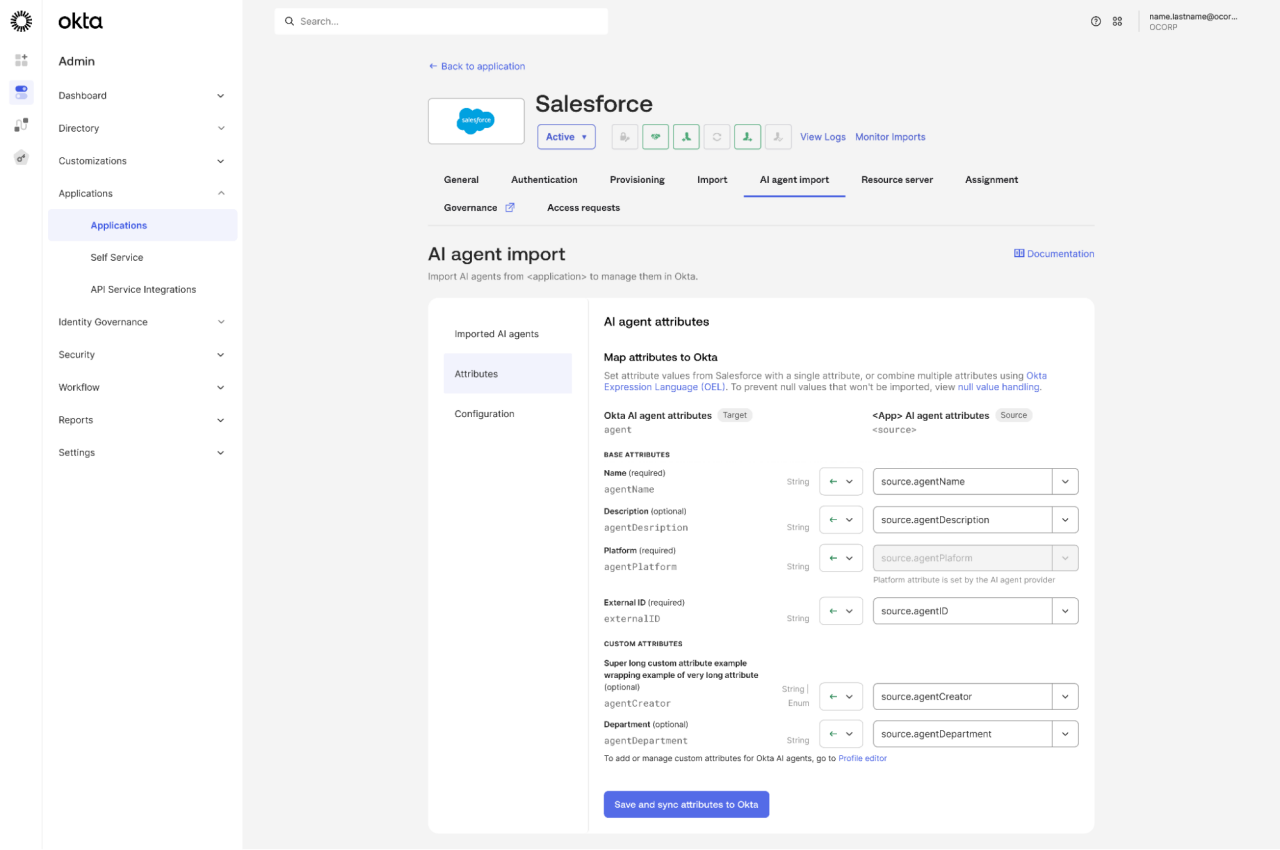 Figure 1: Multi-Source Agent Schema
Now that your agents are in one place with the information you need, the next step is to ensure the registration process can scale without the manual work of creating and rotating credentials for each one.
Register agents without manual credential management
Registering an agent today means creating a credential for it and remembering to rotate it, which is slow and easy to get wrong.
Picture a typical rollout: Your team adopts Claude for a new workflow that summarizes support tickets. Today, bringing that agent online means someone on your team creates a credential for it, stores it somewhere, hands it off to whoever's running the workflow, and puts a reminder on their calendar or an automated Slack message to rotate that credential before it expires.
Each new agent you adopt adds a credential someone has to create, store, hand off, and rotate. Across all the agents your organization adopts this year, that becomes a growing list of credentials that depend on someone remembering to maintain them. In practice, that reminder gets missed more often than anyone would like to admit, and a stale, unrotated credential sitting in a workflow for months is exactly the kind of hidden risk that turns into a potential incident later.
AI Agent Registration with CIMD (in General Availability) removes that manual credential creation and rotation step entirely. For example, Claude, like a growing number of agent platforms, publishes a Client ID Metadata Document: a hosted file at a globally unique URL that describes the agent's identity. Instead of generating and tracking a credential manually, Okta reads that URL directly to register the agent. Its signing keys live in the metadata document, so there's no client secret to issue, store, or rotate.
This means your team sets it up once and typically won't need to manually update it, no matter how many times the underlying credential changes behind the scenes. And because CIMD is based on an open standard, you're not locked into a proprietary client registration method.
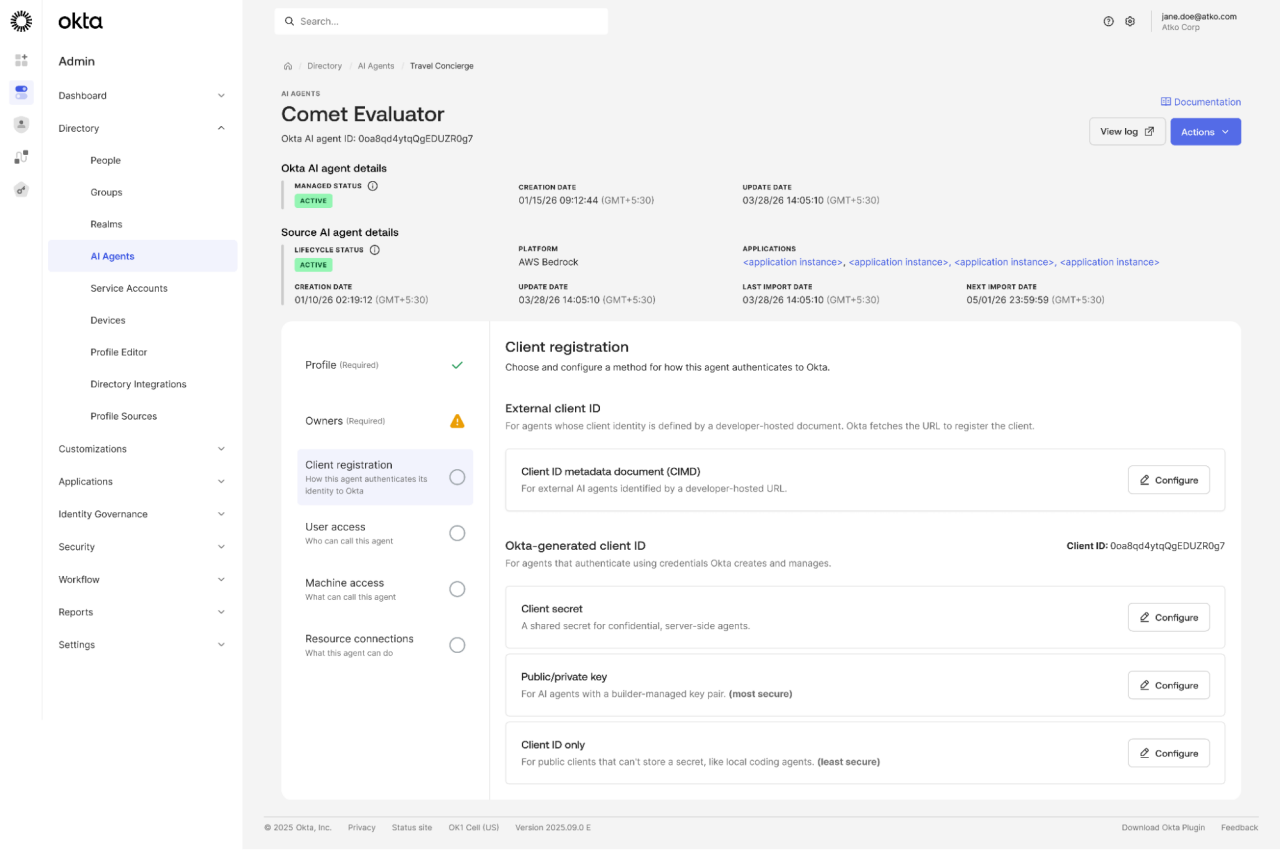 Figure 2: AI Agent Registration with CIMD
Together, these capabilities mean that every agent appears in a single registry, whether it was built in-house, imported from another platform, or registered by an external developer. Each one carries the metadata your organization actually needs, and registration no longer depends on manual credential work.
What can they do?
Simplifying the registration and management of agents from different platforms only solves one part of the governance problem. You also need to control what each one is allowed to reach, and historically, every new MCP server has meant another one-off integration project.
Connect to pre-built MCP servers with minimal setup
Say your team wants to connect an agent to a widely used MCP server, like GitHub, Slack, or Salesforce. This often means manually configuring that integration from scratch.
The Okta Integration Network MCP Server Catalog (in General Availability) turns that redundant work into a browse-and-connect experience. Find the server in the catalog, select scopes, provide credentials, and you're connected. Okta checks that the server is reachable and the credentials are valid before a connection goes live, so admins can catch setup problems before any agent can use the connection.
The result: Every connection lands in one central place that security can see and govern, regardless of which vendor built the server.
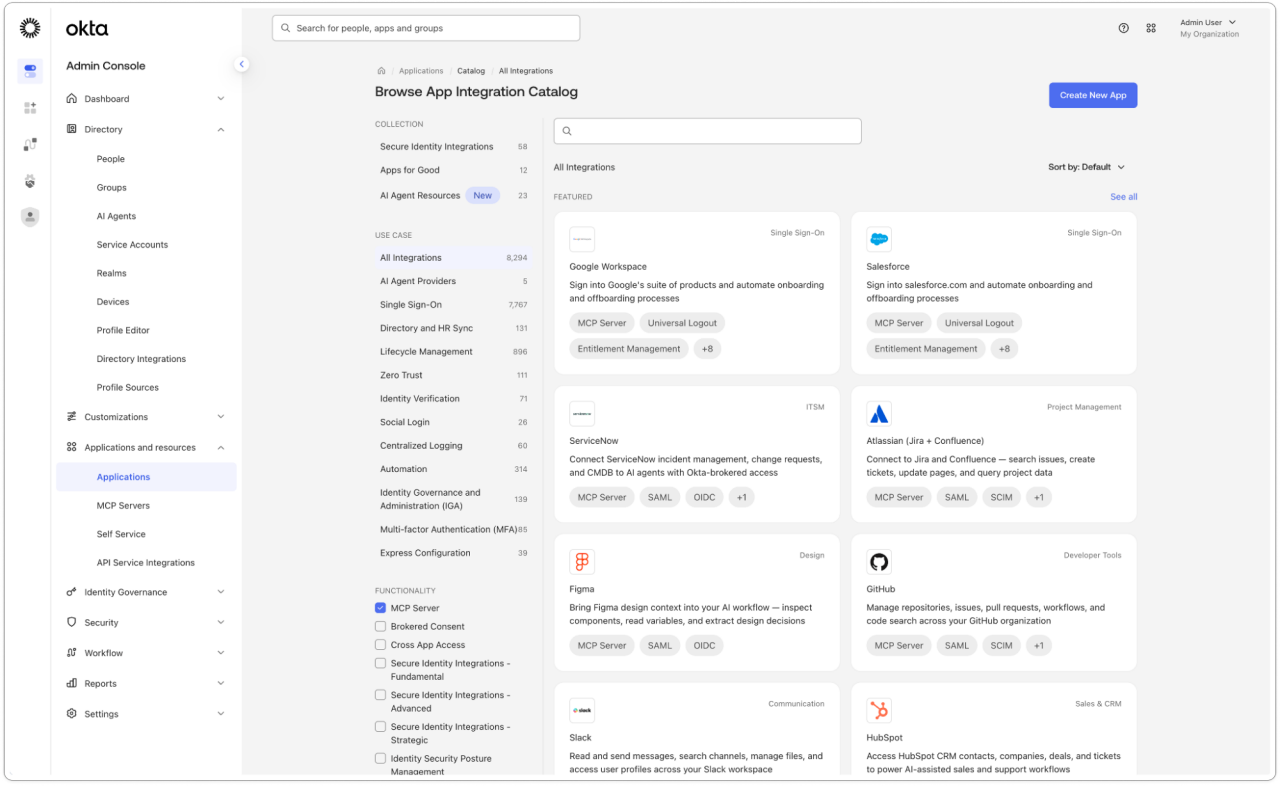 Figure 3: Okta Integration Network MCP Server Catalog
Bring new MCP servers online without the provisioning bottleneck
Not every MCP server your teams need will be sitting in a catalog. You can, however, streamline the setup process with Dynamic Client Registration (DCR).
MCP Server Registration with DCR (in General Availability) lets admins skip the manual process of configuring client credentials for MCP servers such as Figma, Gong, and Sourcegraph. Okta finds the provider's registration endpoint, performs client registration for the admin, and stores the credentials for runtime authentication, so nobody has to request, copy, or share them. If a provider changes its authorization server, admins can re-register from Okta without rebuilding the connection. A team that wants its agents to access Figma no longer has to chase credentials from the provider. An admin adds the server, Okta registers with it, and the agents can start working.
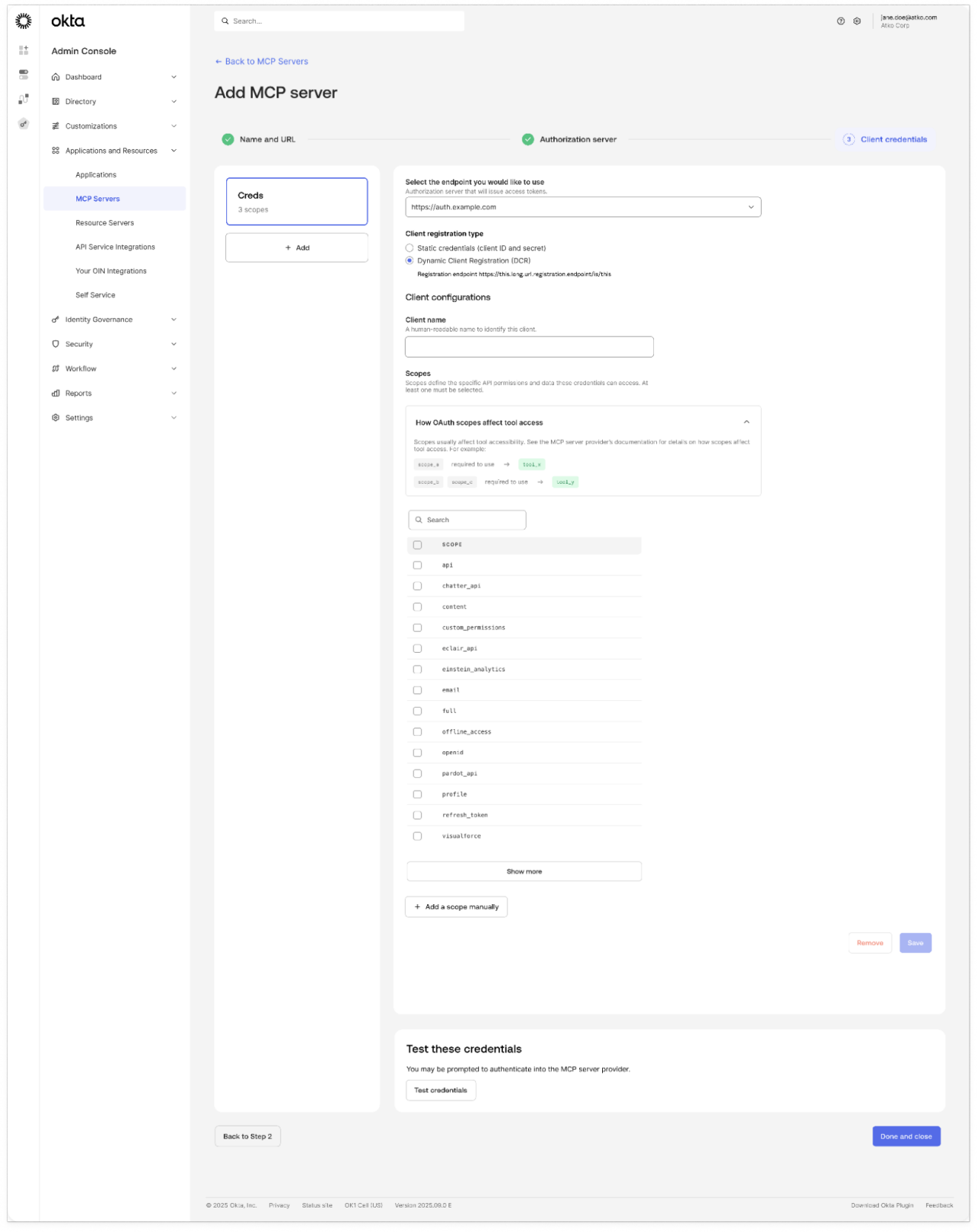 Figure 4: MCP Server Registration with DCR
Govern multiple custom MCP servers under one shared policy
Once you have multiple agents reaching multiple MCP servers, you don't want to configure authorization separately for each one. That's especially true for the servers your own teams build. Imagine your organization runs five custom MCP servers across different product teams: one for internal documentation, one for a ticketing system, one for a customer database, and so on.
Without a shared setup, that's five separate authorization configurations, each maintained by whichever team owns that server. Each one can also drift out of sync with the others over time, until nobody can say with confidence that all five actually enforce the same rules.
Multi-MCP Custom Auth Servers (in General Availability) lets you put all your custom MCP servers behind a single authorization server, governed by a single policy, so a change to that policy applies everywhere at once rather than separate updates. Each server still gets its own audience and scopes, so a token issued for one is rejected by the rest. And because each token records the user and the agents involved, you know which agent to shut down and who owns it if something goes wrong.
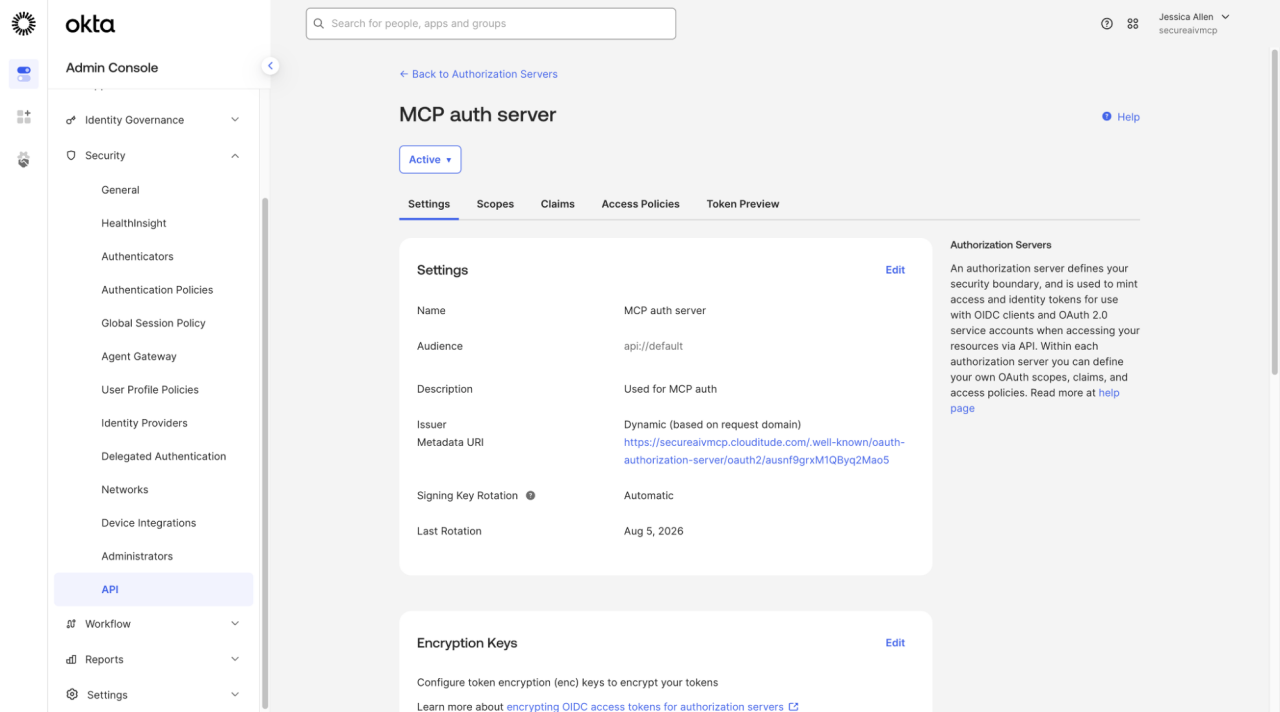 Figure 5: Multi-MCP Custom Auth Servers
This all adds up to simpler, faster connections to the MCP servers you already use, with one policy that scales as the number of servers grows.
The identity layer behind all of it
Every capability mentioned here helps find where your agents are and control what they do while reducing manual, multi-step processes that slow down agent rollouts and increase security risk.
Plenty of solutions can register an agent or secure a connection to a specific server. Few can do both, and fewer still can do it consistently across platforms and typical agent use cases. Managing an agent's full lifecycle, from the moment it's discovered to the moment you need to invoke a kill switch when something goes wrong, means sitting at the identity layer that your people and applications pass through every day.
Okta for AI Agents brings all of this together in a single identity layer to discover, onboard, protect, and govern your agents, built on the same identity foundation that thousands of enterprises already trust to govern their people and applications.
Okta for AI Agents is built to answer all four questions security teams need answered about their agents:
- Where are my agents?
- What can they do?
- What are they doing?
- How do I respond?
Ready to become a secure agentic enterprise? Learn how Okta for AI Agents helps you get there.
* Gartner Press Release, "Gartner Identifies Six Steps to Manage AI Agent Sprawl", April 28, 2026, https://www.gartner.com/en/newsroom/press-releases/2026-04-28-gartner-identifies-six-steps-to-manage-artificial-intelligence-agent-sprawl. Gartner is a trademark of Gartner, Inc. and/or its affiliates.
These materials are intended for general informational purposes only and are not intended to be legal, privacy, security, compliance, or business advice. You are responsible for obtaining security, privacy, compliance, or business advice from your own professional advisors. Any mention of future products, features, functionalities, or certifications in this blog is for informational purposes only. These items are not commitments to deliver and should not be relied upon to make purchasing decisions. © Okta, Inc. and/or its affiliates 2026.


