




TL;DR: Okta Workflows introduces Early Access flow versioning, providing a native 30-day change history and one-click revert capabilities. This feature ensures accountability and reduces operational downtime by tracking who made edits, when they occurred, and what logic changed.
Why flow versioning matters for Okta Workflows
For organizations relying on automation to run mission-critical operations, execution reliability isn't optional. As Okta Workflows integrates more deeply into daily IT, security, HR, and business operations, the stakes of every change go up.
When something breaks, the ability to trace what changed, who changed it, when the change occurred, and how to get back to a working state is the difference between a quick recovery and extended downtime. To help our customers operate their automations with confidence and accountability, we are excited to announce the Early Access (EA) release of flow versioning for Okta Workflows.
The vision: Governance at the speed of automation
Our goal is to make Okta Workflows the most trustworthy automation platform for enterprise IT. Speed and accountability work best together. With the right visibility tools in place, teams can iterate quickly without losing sight of what's changing in their flows.
This release is the first step in a broader product roadmap for versioning and lifecycle management. By introducing native version history and revert capabilities, we are giving builders and administrators the tools to move quickly and confidently, knowing that every change is tracked, attributed, and reversible.
Why is native change history critical for automation security?
When a critical flow fails, teams must immediately identify what changed. Historically, that question has been surprisingly hard to answer.
Currently, Workflows lacks a built-in record of edits; there’s no way to view a former flow state or to quickly revert to a previously stable version.
For teams running automations that handle deprovisioning, a misconfigured flow isn't just an operational inconvenience—it's a security risk. If a deprovisioning flow breaks after an edit, former employees or contractors may retain access to systems they should no longer have, creating compliance exposure for regulated organizations. Without visibility into what changed and when, identifying and fixing the issue requires manual investigation at exactly the moment you have the least time for it.
The solution: Complete history of every change
Now, every saved workflow edit automatically generates a new version, no configuration required. This zero-configuration system applies globally across all of your org’s flows once enabled.
Each version captures:
- Who made the change: Workflows attributes each version to the user who saved it, providing a clear chain of accountability across your team
- When it happened: Versions include timestamps so you can reconstruct the timeline of any flow's evolution
- The complete flow state: Browse any version to see exactly how the flow looked at a given point in time
You can access version history directly in the flow builder via the Version History panel. This allows you to review the full history of a flow and navigate to any past version without leaving the builder. Workflows retains version history for all of your automations and integrations for 30 days.
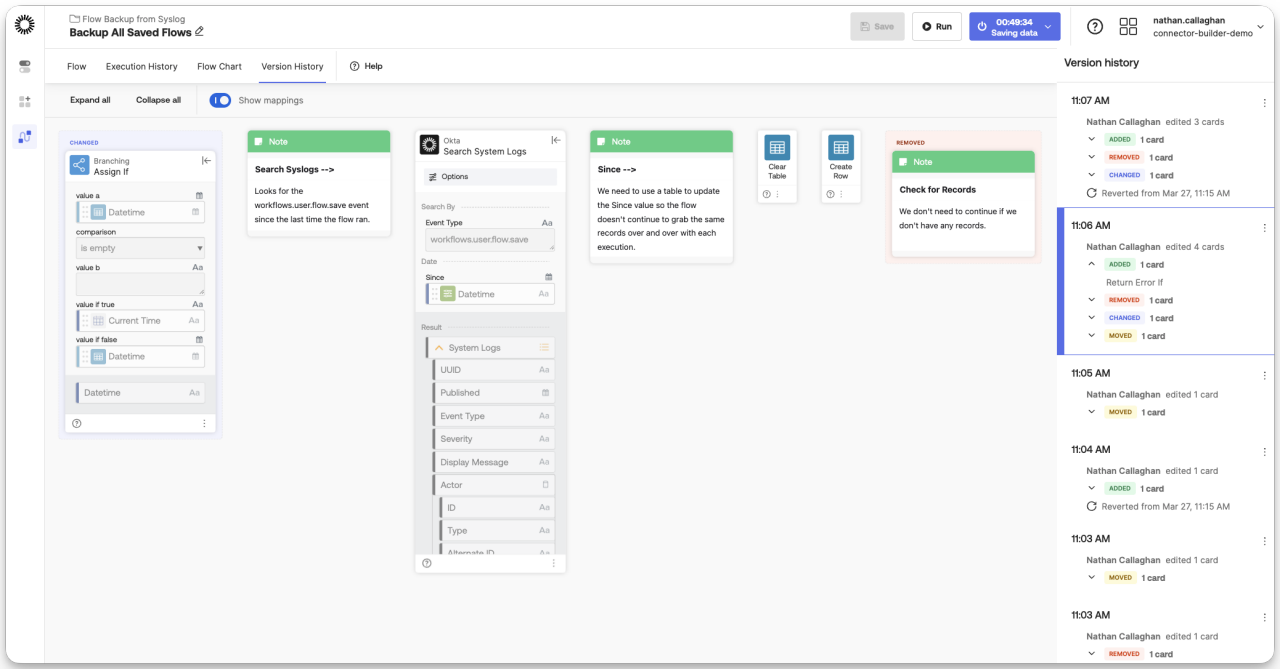 The new Version History panel provides a detailed breakdown of edits, making it simple to track updates and see exactly who added, changed, moved, or removed cards in your flow, and precisely when.
Get back to what was working
When you identify a version you want to restore, reverting is a single action. Workflows creates a new version that matches the selected historical state.
Workflows preserves your current version in the history, meaning you never lose your work. You maintain a complete record of all actions, including the revert itself.
This non-destructive approach lets you revert with confidence. If the restored version isn't what you need, you can revert again to any other point in the available history. Your org's role-based access controls govern access to the revert feature.
Accountability across your team
For administrators and compliance teams, version history provides the audit trail that regulated environments require. Workflows logs every change with the user and timestamp, making it straightforward to answer questions like:
- Which user last modified this flow before the issue started?
- When did this flow change, and does the timing align with a reported issue?
- What was the state of this flow at the time of a specific execution?
Combined with execution history, these capabilities give teams a complete picture of both the flow logic and the runtime behavior at any point in time.
How to enable flow versioning in Okta Workflows
Flow versioning is now available in Early Access across all plans. Here’s how to enable it on production orgs:
- Enable the feature: Navigate to Settings > Features in your Okta Admin Console and turn on Workflows Audit and Revert
- Review your critical flows: Open Version History on the flows your team edits most frequently. You'll immediately see a complete, attributed history of every change made since the release date.
- Explore the documentation: Read our technical documentation for a full breakdown of version retention, revert behavior, and known limitations
Early Access users: Provide feedback on Okta Workflows flow versioning
We're committed to building the governance and reliability capabilities that enterprise automation requires. We look forward to your feedback as we continue to build out our flow lifecycle management roadmap.
Have feedback? Reach out through your customer success contact or submit to Okta Ideas.
These materials are intended for general informational purposes only and are not intended to be legal, privacy, security, compliance, or business advice. © 2026 Okta, Inc. and/or its affiliates.


