





In the world of identity, we often talk about the gold standard of access control as being hardware-protected, phishing-resistant, and yet seamless for the end user. But historically, achieving that level of assurance on the desktop—specifically for macOS—meant navigating complex certificate deployments or settling for “good enough" solutions like password syncing.
At Okta, we believe that high-assurance security shouldn't be a trade-off for user experience. That’s why Okta Device Access now supports Secure Enclave-backed keys through Platform Single Sign-on (Platform SSO) for macOS. This configuration shifts authentication away from password synchronization and entirely toward hardware-bound identity.
By anchoring authentication directly to the secure, tamper-resistant hardware built into modern Macs, IT teams can verify that devices are exactly what they claim to be, while users experience frictionless authentication.
How does Platform SSO move beyond password syncing?
One of the biggest misconceptions about Platform SSO is that it’s just another way to sync your Okta password to your local Mac account. While Okta supports Desktop Password Sync, configuring the Platform SSO authentication method to utilize a Secure Enclave-backed key changes the underlying security architecture.
In this mode, no password syncing is required. Instead, Okta leverages the Platform SSO extension to create a unique cryptographic, hardware-bound key. As part of the Platform SSO enrollment process, the user is also auto-enrolled in Okta FastPass, and this new hardware-bound key is directly associated with the user's FastPass enrollment.
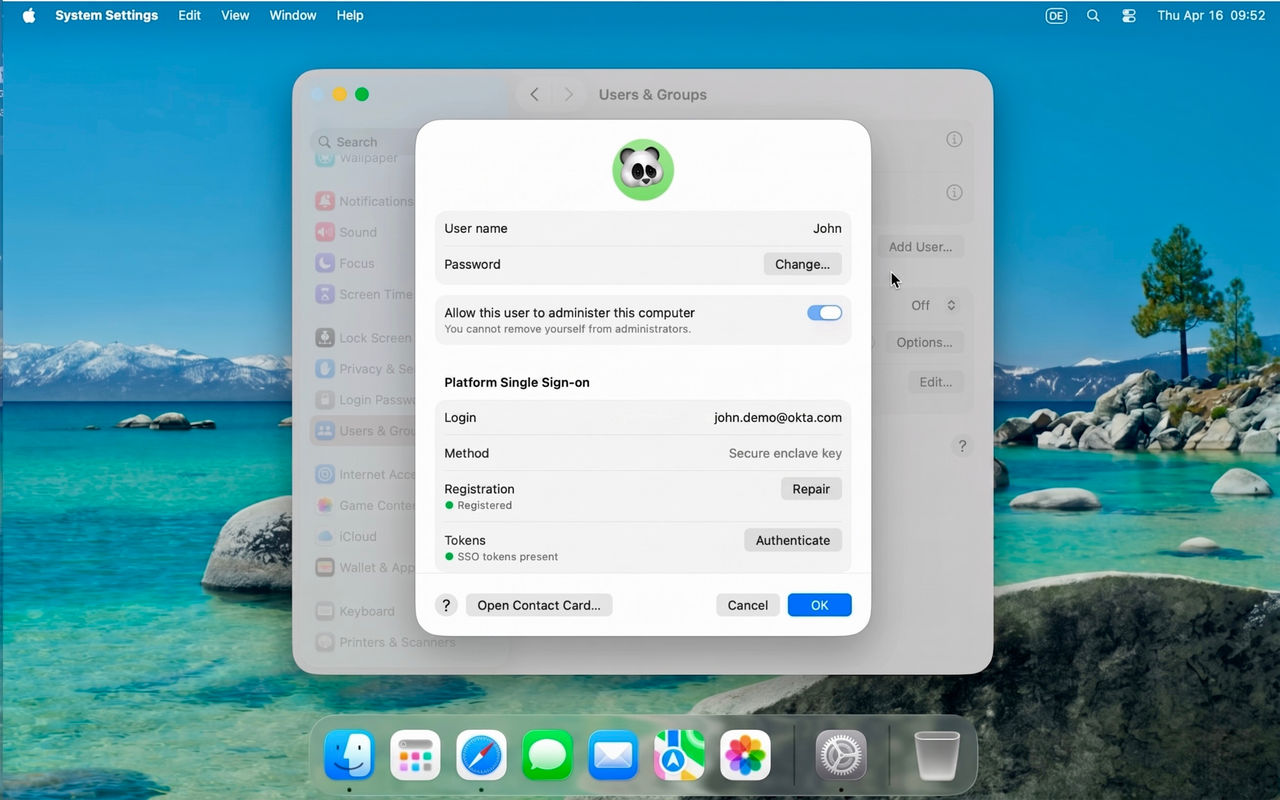
This Secure Enclave-backed key is available after a successful Mac login or unlock. When a user tries to sign in to an Okta-protected application, they can access it via FastPass for phishing-resistant, passwordless authentication.
Eliminating authentication friction with hardware-protected sessions
For Okta admins, the most powerful aspect of this feature is how it interacts with your authentication policies.
Before this feature, if a policy required FastPass authentication with user verification (for example, biometrics or a PIN) for access to sensitive corporate resources, a user who had already logged in to their Mac would see an additional Okta Verify prompt or biometric check.
The Secure Enclave-backed key is inextricably linked to Okta’s Device-Bound SSO, which initiates a hardware-protected SSO session for seamless access to your downstream apps after device login. This means that by leveraging Platform SSO with a Secure Enclave-backed key, you would effectively pre-verify the session at the hardware level. And what you get as a result is:
- Trust from device login: When the user logs in to their macOS device, the resulting SSO session is inherently hardware-bound from the beginning
- App policies are satisfied: Because this session is cryptographically tied to the user's FastPass enrollment and verified by the user's initial login (often via Touch ID), Okta recognizes this as meeting any policy that requires FastPass with user verification
- Reduced login friction: The user gets to work without additional prompts, just seamless, phishing-resistant access to their apps

Security benefits of hardware-bound identity
By moving away from passwords and toward hardware-bound authentication methods, we’re closing the door on the most common attack vectors:
- Phishing attacks: Since authentication is tied to a private key in the Secure Enclave, there is no password for a user to mistakenly enter on a phishing webpage
- Session replay: Even if an attacker were to steal a session token, it would be useless without the physical hardware key it’s bound to
With this expanded support for Platform SSO, Okta Device Access turns the Mac itself into a high-assurance authenticator. It shifts trust to the silicon while ensuring that the right way to log in is also the fastest.
Want to learn more? See how you can enable Platform SSO in your environment by checking out the latest Okta Device Access documentation.
Any mention of future products, features, functionalities, or certifications in this blog is for informational purposes only. These items are not commitments to deliver and should not be relied upon to make purchasing decisions.


