





Key takeaways:
Integrating Okta with multilateral federation frameworks like InCommon or EduGAIN requires a federation adapter (like Cirrus Identity or Shibboleth) to bridge Okta’s bilateral SAML architecture with InCommon’s dynamic metadata registry.
Institutions can deploy Okta as an InCommon identity provider (IdP) for outbound access or as a service provider (SP) for inbound collaboration.
Introduction to Okta and InCommon integration
For higher education institutions and partner research facilities, utilizing the InCommon framework is essential. Traditionally, Okta doesn't support the multilateral federation model used by InCommon—however, there is a solution. This guide provides a technical overview and architectural patterns for integrating an Okta tenant with a multilateral federation model such as InCommon or eduGAIN, enabling you to participate in the InCommon Federation as either an identity provider (IdP) or a service provider (SP).
Core integration use cases
This guide is designed for identity architects at institutions that use Okta as their primary identity platform but require interoperability with the broader research and education (R&E) community through InCommon—either as an InCommon IDP or InCommon SP.
We will explore two primary scenarios:
- Okta as an InCommon IdP: Granting authenticated students at Okta-enabled institutions access to third-party InCommon resources
- Okta as an InCommon SP: Securing institutional applications with Okta while allowing the broader InCommon community to access them
While we will show Okta on both sides of the transaction, the models apply to other enterprise identity and access management (IAM) solutions.
Contextualizing federation terminology: IdP vs. SP
The use of the terms identity provider (IdP) and service provider (SP), while appropriate, can be context-dependent.
- In architectural pattern 1 (Okta as InCommon IdP): Okta is the IdP for university applications and the IdP for the federation adapter, Cirrus Bridge. The adapter acts as an SP to Okta. However, in this use case, Cirrus Bridge also functions as an InCommon IdP, allowing students and faculty to get SSO to third-party resources that act as InCommon SPs. In this case, Okta is an IdP, Cirrus Bridge is both an SP and an IdP, and the third-party resources are SPs.
- In architectural pattern 2 (Okta as InCommon SP): Okta is the IdP for the research institution applications used by both Students/Faculty of the research institution. At the same time, Okta allows external InCommon users into the application. For external InCommon users, Okta is an SP, and the Cirrus Proxy is the IdP. However, the Cirrus Proxy is an InCommon SP.
Comparing federation models: Bilateral vs. multilateral
Okta's bilateral federation model
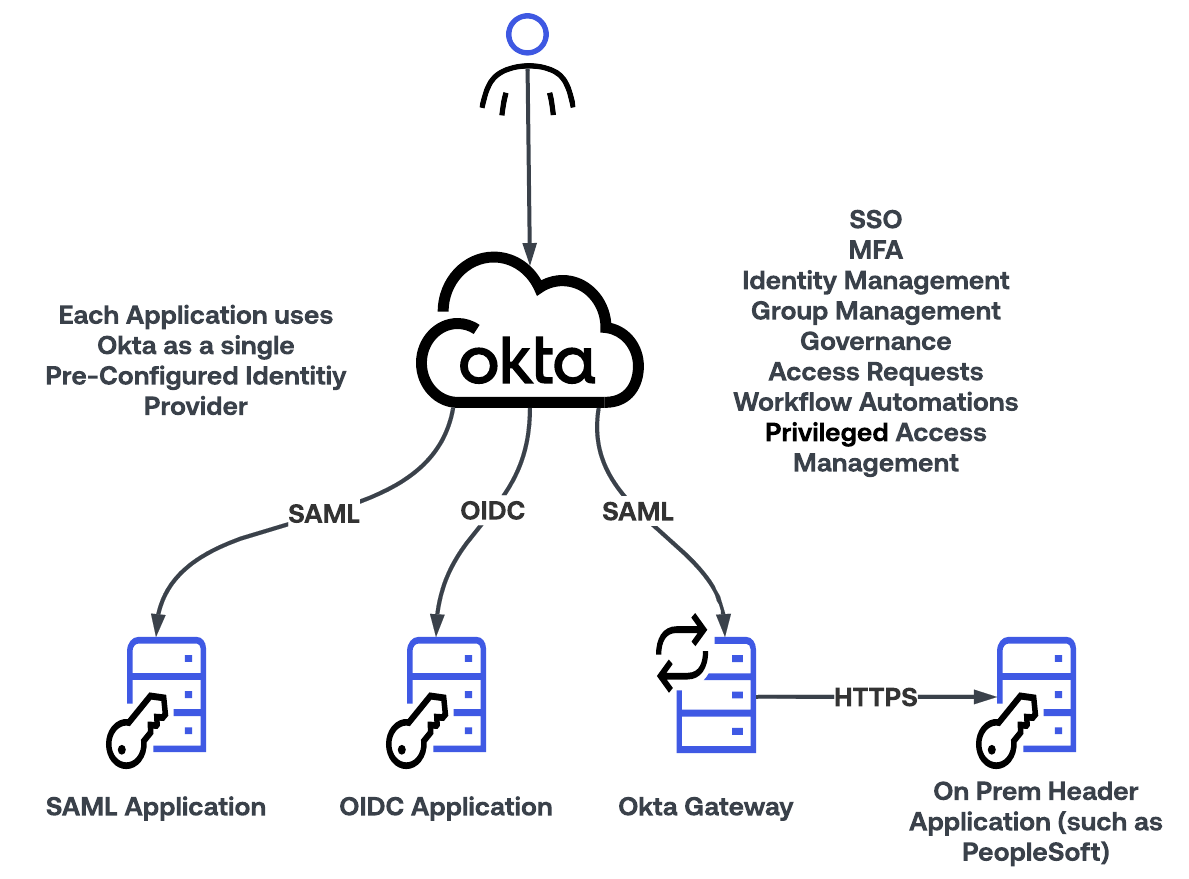
Okta is the market-leading IAM service built to provide access to security assertion markup language (SAML), OpenID Connect (OIDC), and on-premises header-based applications. Many higher education and research institutions use Okta, and in some cases, a single institution can serve as both an IdP and an SP. The Okta federation architecture relies on a unique, point-to-point trust relationship configured between a single IdP and a single SP.
This point-to-point approach is referred to as a bilateral federation, which is the standard model used by all major commercial IAM vendors. This model provides granular control and is standard for enterprise and commercial applications.
InCommon's multilateral federation model
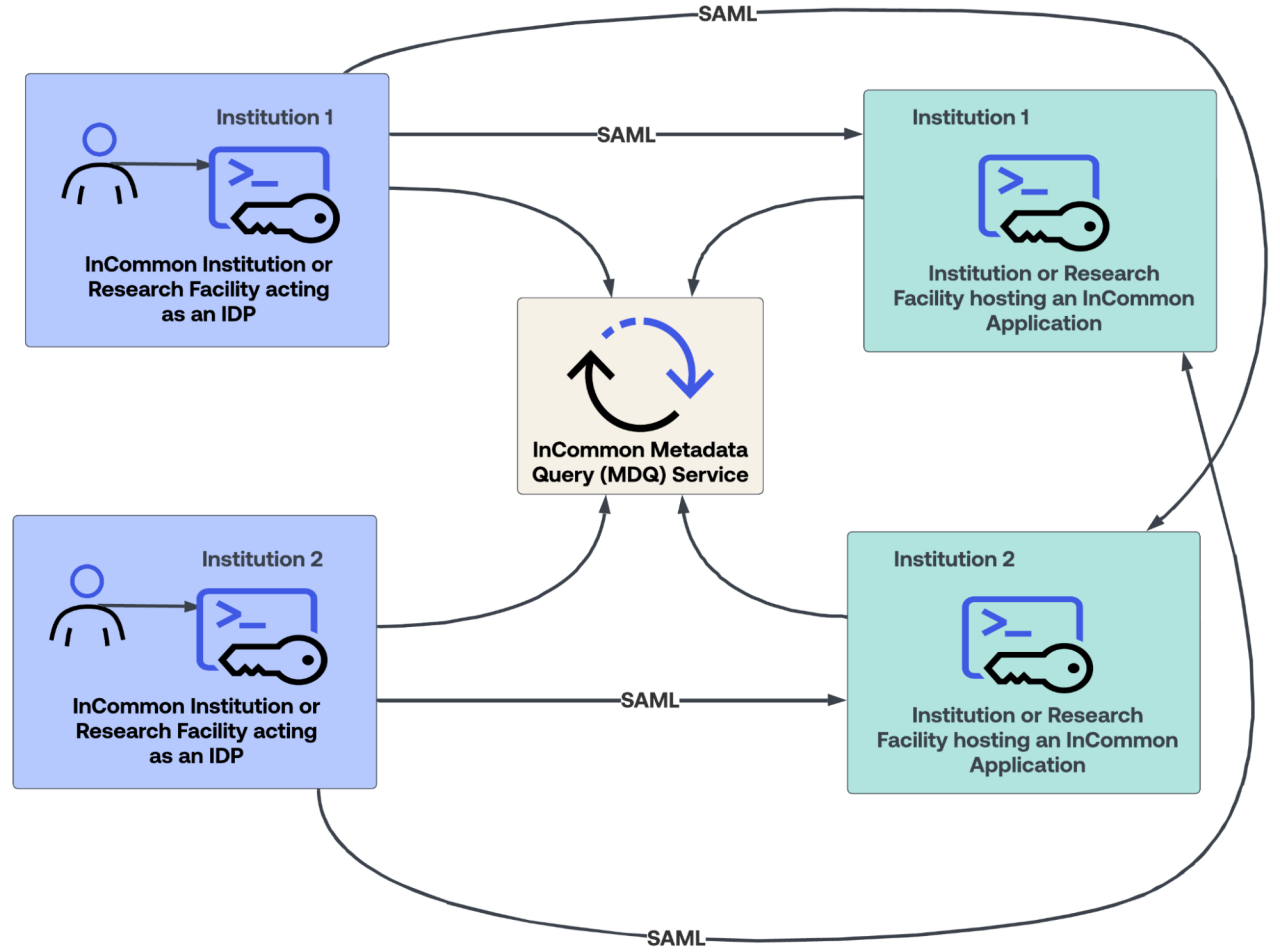
In contrast to Okta’s bilateral approach, which requires a specific, pre-configured connection for each federation partnership, InCommon operates on a multilateral federation model. This is a many-to-many trust framework that allows thousands of participating institutions to interoperate without creating individual bilateral relationships.
A central trust registry makes this possible by hosting a metadata service that contains the SAML metadata for all members. InCommon provides this trust registry as either the "Legacy SAML Metadata Aggregate" or the "Metadata Query (MDQ) Service." An SP can trust the entire InCommon federation and, by consuming this metadata, accept authentication from any registered IdP.
While multilateral federation and the metadata service are the biggest differentiators between a commercial model and the R&E community model, they are not the only differences. InCommon also defines standardized authentication and attribute requirements:
- Expressing specific multi-factor authentication (MFA) assertions compliant with the REFEDS MFA Profile.
- Releasing standardized user attribute bundles based on predetermined consent frameworks.
Because Okta does not natively support the dynamic metadata consumption required for multilateral federation, you must use a federation adapter as an intermediary.
The federation adapter architecture: A prerequisite for integration
To bridge the gap between Okta's bilateral model and InCommon's multilateral model, you must use a specialized adapter on both the IdP and the SP sides of the connection.
- As an InCommon IdP (pattern 1): this adapter processes the InCommon metadata feed and communicates with Okta via a standard bilateral SAML connection.
- As an InCommon SP (pattern 2): this adapter prompts the user to identify their home institution, looks up the metadata for that institution, generates the correct authentication request to that institution, and then consumes and validates the incoming SAML assertion.

Choosing an adapter: Shibboleth vs. Cirrus Identity
The R&E community widely accepts two primary adapter solutions: Cirrus Identity and Shibboleth.
Cirrus Identity: A commercial, SaaS-based solution designed specifically for this purpose. It simplifies deployment and management. Cirrus offers two different solutions: Cirrus Bridge, used in use case 1 (InCommon IDP); and Cirrus Proxy, used in use case 2 (InCommon SP). Cirrus provides detailed documentation for these integrations, which serves as the primary reference:
Okta-Specific Cirrus Bridge Setup Guide
Shibboleth: An open-source software project widely used in the R&E community. You can deploy it on-premises or in a private cloud. The Shibboleth IdP software serves as the adapter component. Key resources include:
Both Cirrus Identity and Shibboleth will work when using Okta and an InCommon adapter. Your choice of solution depends on your organizational preferences.
| Feature | Cirrus Bridge/Proxy | Shibboleth |
|---|---|---|
| Deployment Model | SaaS (Software-as-a-Service) | Self-Hosted (On-Premises or Cloud Virtual Machine) |
| Pros |
|
|
| Cons |
|
|
Architecture pattern 1: Okta as an InCommon identity provider
In this scenario, a university uses Okta for its students, faculty, and staff. The university feeds Okta from its student information and/or HR systems and provides provisioning, single sign-on (SSO), and MFA for various apps, including Google Workspace, Microsoft Entra ID, Canvas, and Blackboard. Okta also provisions users to Active Directory. The goal is to allow university users to access external InCommon-federated services, such as research journals, third-party library services, and NSF applications.
Architecture setup
- The university registers Cirrus Bridge as its official IdP in the InCommon trust registry.
- Cirrus Bridge is configured to point upstream to the university’s Okta tenant as its authoritative SAML IdP.
- Okta handles primary user authentication, MFA enforcement, and core identity lifecycle management.

How authentication flows work for Okta as an IdP
For an IDP-initiated flow, start with the optional login
- The unauthenticated user logs directly into the Okta end-user dashboard.
- The user clicks a link to the target external InCommon application.
- Okta generates a SAML assertion and sends it to Cirrus Bridge.
- Cirrus Bridge translates the assertion into a multilateral format and passes it to the target resource.
For a SP-initiated flow, do not use the optional login, and perform the login when required
- The user navigates directly to the target third-party InCommon resource.
- The resource redirects the user to Cirrus Bridge using the InCommon metadata lookup.
- Cirrus Bridge redirects the user to Okta for primary credential verification.
- Upon successful authentication, Okta issues a token to Cirrus Bridge, which forwards the user back to the resource.

Architecture pattern 2: Okta as an InCommon service provider
In this scenario, a research institution uses Okta to secure access to its applications. Instead of issuing separate credentials for each user, the institution wants to accept users from the InCommon Federation. This allows those users to access the research institution’s applications using their own university credentials without creating a new account. The research institution also wants to enable direct login for their research staff.
Architecture setup
- Cirrus Proxy is registered as an InCommon SP in the multilateral registry.
- Okta is configured to trust Cirrus Proxy as an inbound IdP using a bilateral SAML setup.
- The target applications remain integrated directly with Okta as standard SSO on applications.

Identity discovery and authentication flows
An important component when enabling InCommon access into Okta is ensuring that users log in through the proper paths.
Direct login flow for internal staff
- Internal research staff access the application directly through their Okta account.
- Okta authenticates internal users directly without invoking the external discovery pipeline.
SP-initiated login flow for external InCommon users
An external user navigates directly to the application or from their home university dashboard. At this point, the user can be prompted for their credentials using either of the two approaches below. The approach will be based on the institution's requirements.
User > Access Resource > Okta presents login widget with link to discovery screen on Cirrus Proxy
User can directly log in through the Okta widget or select to “Login with InCommon,” which takes them to the IDP discovery screen on Cirrus Proxy

User > Access Resource > Cirrus Proxy presents a login page with an Okta widget link
User is immediately shown the Cirrus Proxy IDP discovery screen
Staff can log in directly through the Okta widget
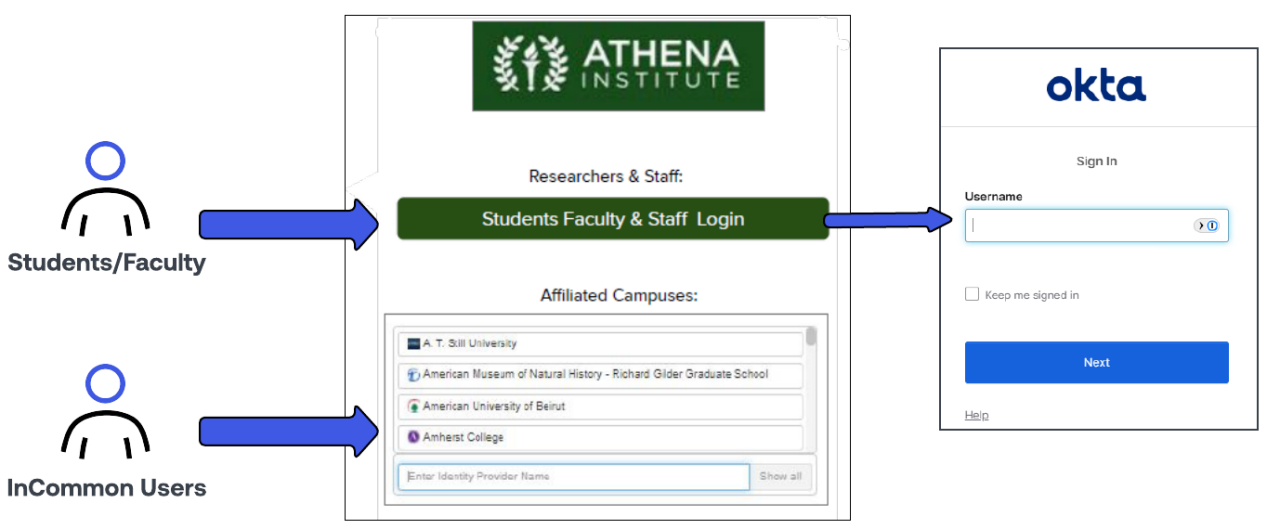
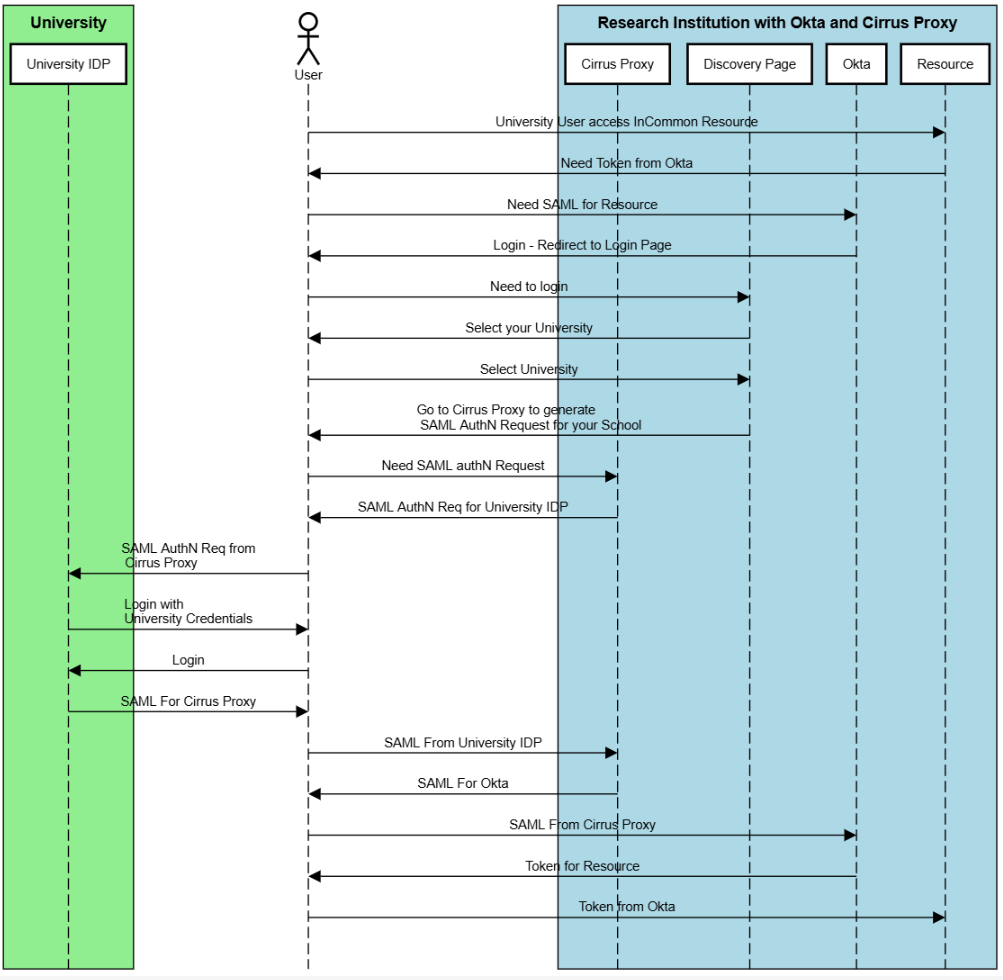
In this example, the user chooses to use InCommon for authentication.
- The user is redirected to the Cirrus Proxy discovery interface to select their home institution.
- Cirrus Proxy queries the MDQ service, retrieves the home institution’s SAML metadata, and redirects the user to their local university login page.
- After successful login at the home university, the home IdP sends a SAML assertion to Cirrus Proxy.
- Cirrus Proxy validates the assertion and sends a formatted assertion to Okta, granting the user access to the application.
Streamline your multilateral federation with Okta
Integrating Okta with multilateral federations doesn’t have to be complex. Our Cirrus Federation Bridge integration enables authentication and provisioning for end users at higher education and research institutions.
Unlike other identity management toolkits, Okta doesn’t require you to spend time and resources manually connecting web applications to your user directories. Instead, we integrate applications directly into our service, so you can simply deploy them to your users.
Download the Application Integrations Whitepaper to learn more about how we simplify application connections across your entire ecosystem.


