


Executive Summary
Okta Threat Intelligence has identified multi-stage phishing campaigns targeting organizations that use Microsoft applications and - where access to these apps are federated - Okta as Identity Provider (IdP).
Our findings, first researching a distinct campaign which we label O-UNC-037, subsequently led us to several other campaigns using the same phishing kit and a very similar lure theme. However, diversity in the infrastructure and style suggests that while these use the same kit and theme, they are likely separate campaigns run by other threat actors. This report focuses on O-UNC-037, although we share details of the other campaigns in the appendix at the end of this report.
The O-UNC-037 campaign has been active since at least October 2025, and largely targets technology and industrial supply organizations. It delivers phishing emails using an employee benefits or human resources (HR) themed lure to deceive users into entering their credentials on a fake Microsoft sign-in page.
The phishing infrastructure uses Adversary-in-the-Middle (AitM) techniques to intercept authentication flows in real-time, capturing credentials, MFA codes and any session tokens established during the sign-in event. This capability can bypass the protection of several common MFA methods, such as SMS codes and one-time passwords (OTP) from authenticator apps.
For organizations that use Okta for Single Sign-On (SSO), the attack then escalates to a second stage, redirecting victims to a malicious replay of an Okta sign-in page on the second-stage phishing domain, which acts as a relay server to additionally capture their Okta credentials and steal the session cookie.
Threat Analysis
This phishing campaign uses a multi-stage attack technique. It specifically targets Microsoft accounts, and handles Okta SSO redirection when encountered. The attack chain involves several steps designed to direct targeted users to an AitM credential harvesting page.
Observed Tactics, Techniques and Procedures (TTPs):
Infrastructure and Initial Access:
Phishing emails are delivered with subject lines customized to include the user's name and lures such as “Employee Benefits Alert” or “secure message from HR Department” to create a sense of urgency.
Campaigns use redirector domains to funnel targeted users towards the primary phishing sites, while bypassing email gateway controls.
Campaigns require users to solve a Cloudflare CAPTCHA before presenting the phishing page.
Execution and Credential Theft:
Uses Adversary-in-the-Middle (AiTM) techniques capturing credentials, MFA codes and session tokens by intercepting authentication flows.
Deploys a multi-stage phishing attack, first targeting Microsoft credentials and then pivoting to Okta SSO if federation is detected.
Phishing Kit and Lure:
Very likely leverages a Phishing-as-a-Service (PhaaS) platform, or a highly configurable phishing kit, evidenced by URL parameters for campaign tracking and template loading.
Uses a generic but effective "Employee Benefits" social engineering lure.
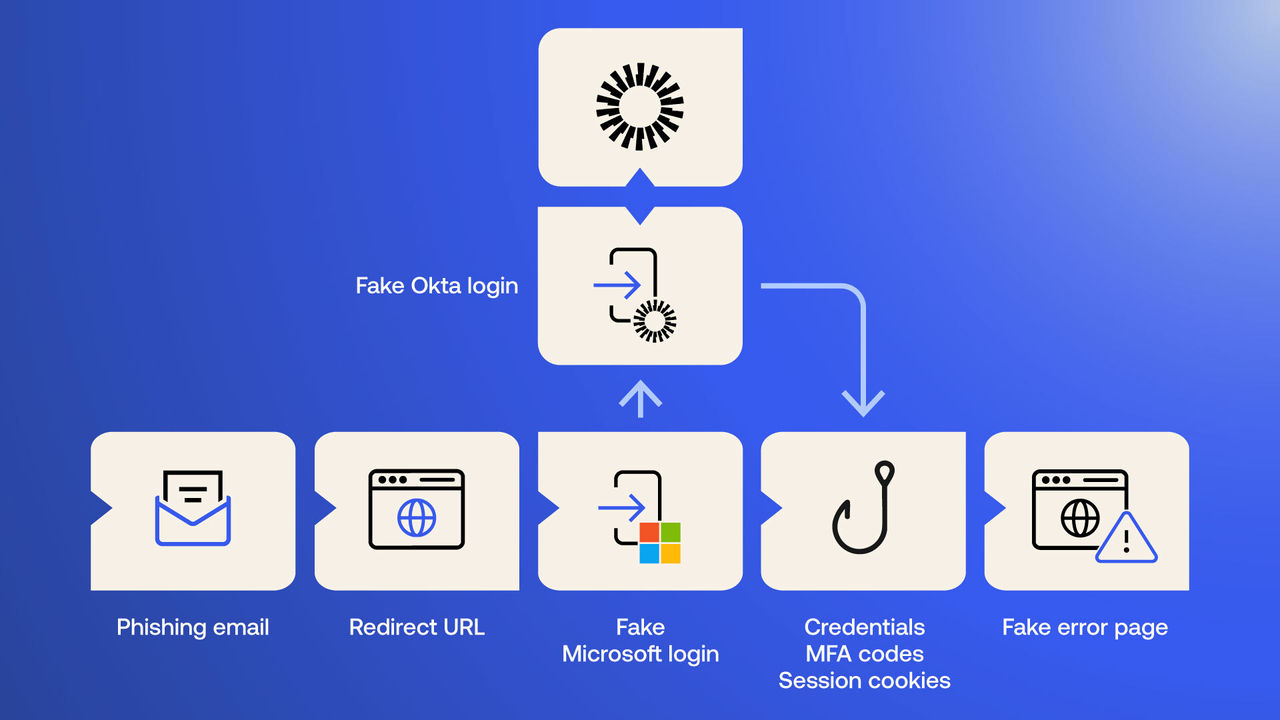 Figure 1. Multi-Stage O365 Phishing in Federated Environment
Email lures
The attack begins with a phishing email sent to the target. Based on their visual characteristics, these highly convincing email lures are likely generated using a Large Language Model (LLM). The emails use sender names and subjects designed to create a sense of urgency and legitimacy related to employee benefits or secure communications.
Examples of observed email headers:
From: ADP BENEFITS <notifications[@]duobenefits[.]com>
Subject: [User Name]! Employee Benefits Alert - New Changes Effective Now
From: Secure Mail <noreply[@]mailsafe365[.]com>
Subject: [User Name]! You've received a secure message from HR Department
We also observed examples of what appears to be abuse of the third-party email marketing platform of a genuine organization, possibly through a compromised account:
From: ADP Benefits <notifications_adp_com[@]emails[.]t██████s[.]org>
Subject: Confidential: [User Name]! Your Benefits Package Has Been Updated
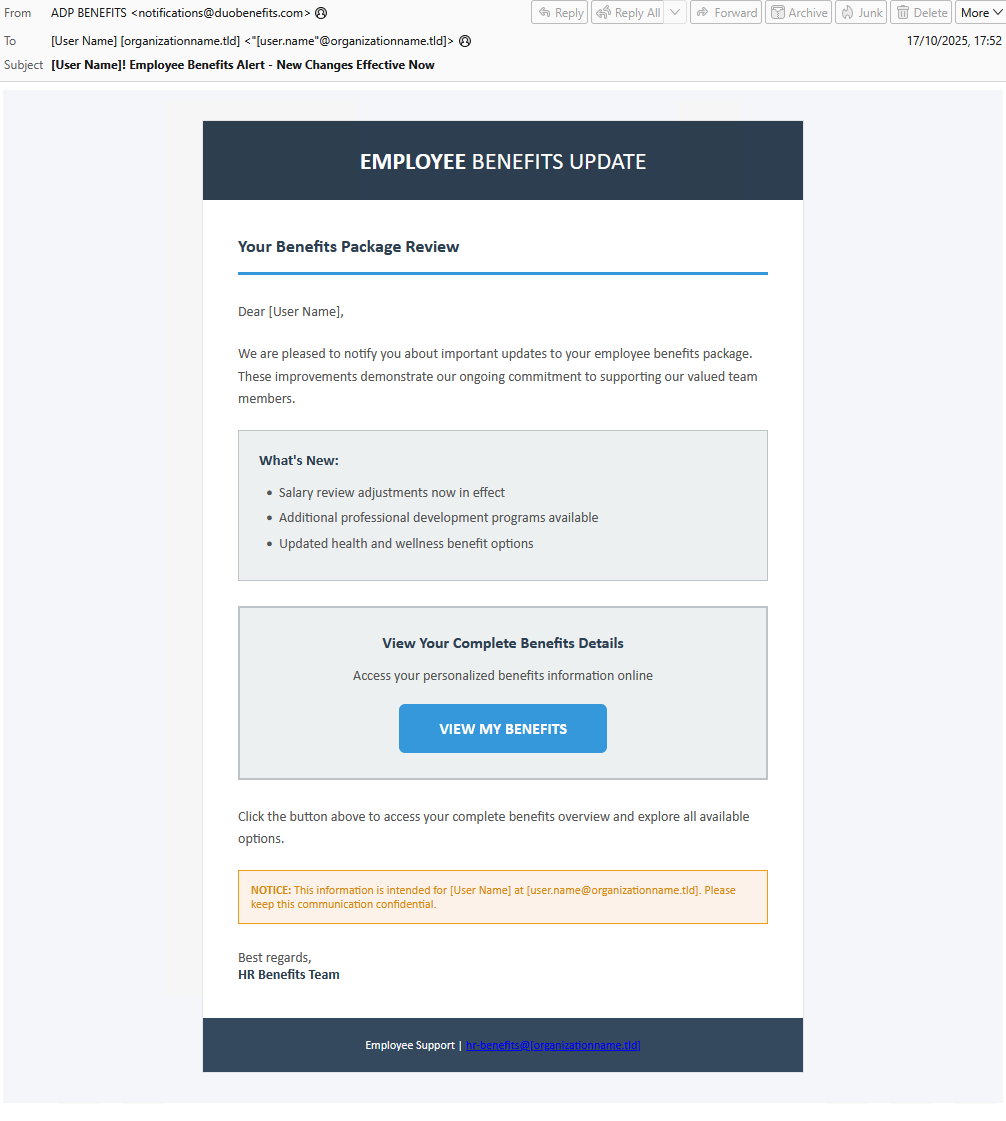 Figure 2. Phishing email using “Employee Benefits" lure
Initial redirector links in emails
Users are first directed to the phishing infrastructure via initial redirector links within the emails. Most of these are first-party newly registered domains, avoiding historical reputation issues to bypass email security measures:
benefits-alerts[.]com
benefitsapp001[.]com
qrcodelnk[.]com
302lnk[.]com
goto365[.]link
fastlink247[.]link
link24x7[.]link
fast2url[.]link
url247[.]link
We also noticed a redirector-link example abusing the legitimate account of an organization on a third-party email marketing service for redirection:
t██████s[.]msg███[.]com
One redirection-link example uses the compromised website of a genuine organization:
Marketing.s██████y[.].com
Using compromised email marketing service accounts, or compromised genuine websites, is an effective measure to achieve higher deliberability during phishing campaigns..
The redirector layer also affords the threat actor an ability to substitute replacement phishing pages, should any second-stage pages be taken down.
Security challenge
Upon redirection to the primary phishing site, the user is first presented with a page titled "Security Verification", employing a genuine Cloudflare CAPTCHA. This step is designed to both appear legitimate and acts as a “gatekeeper” to evade automated analysis of the phishing site.
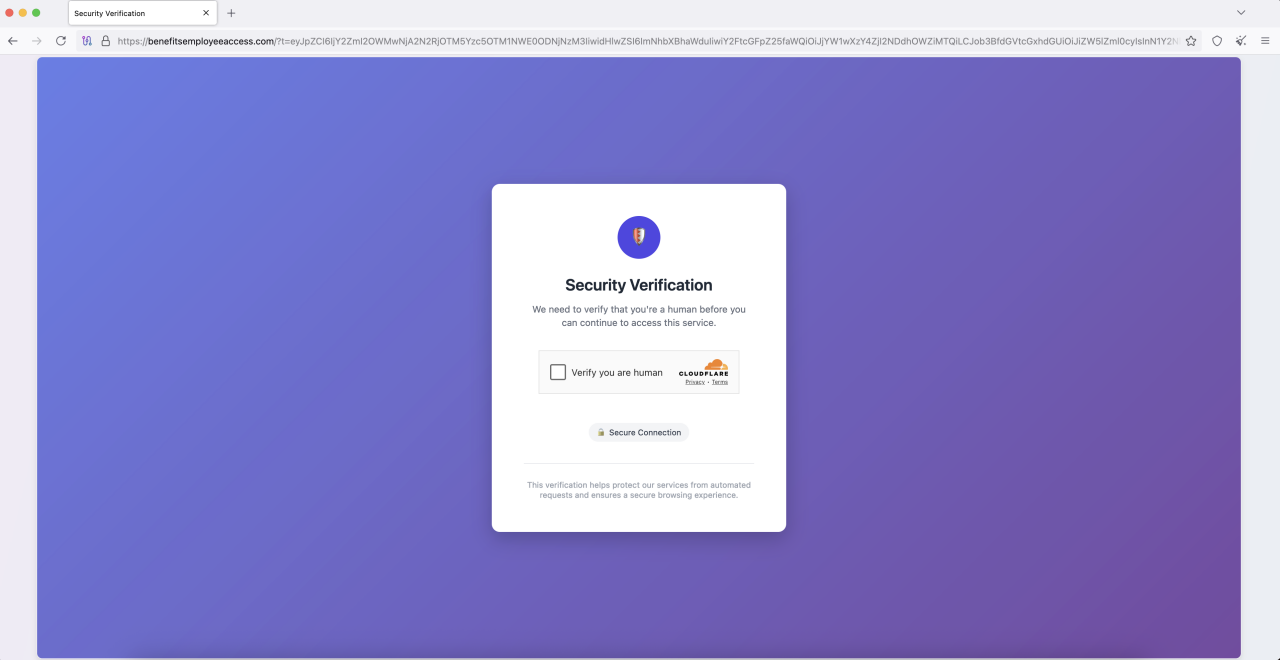 Figure 3. Cloudflare CAPTCHA "Security Verification"
Splash page
Once the CAPTCHA challenge is completed, the site next briefly serves up a splash screen themed to suit the aforementioned lure.
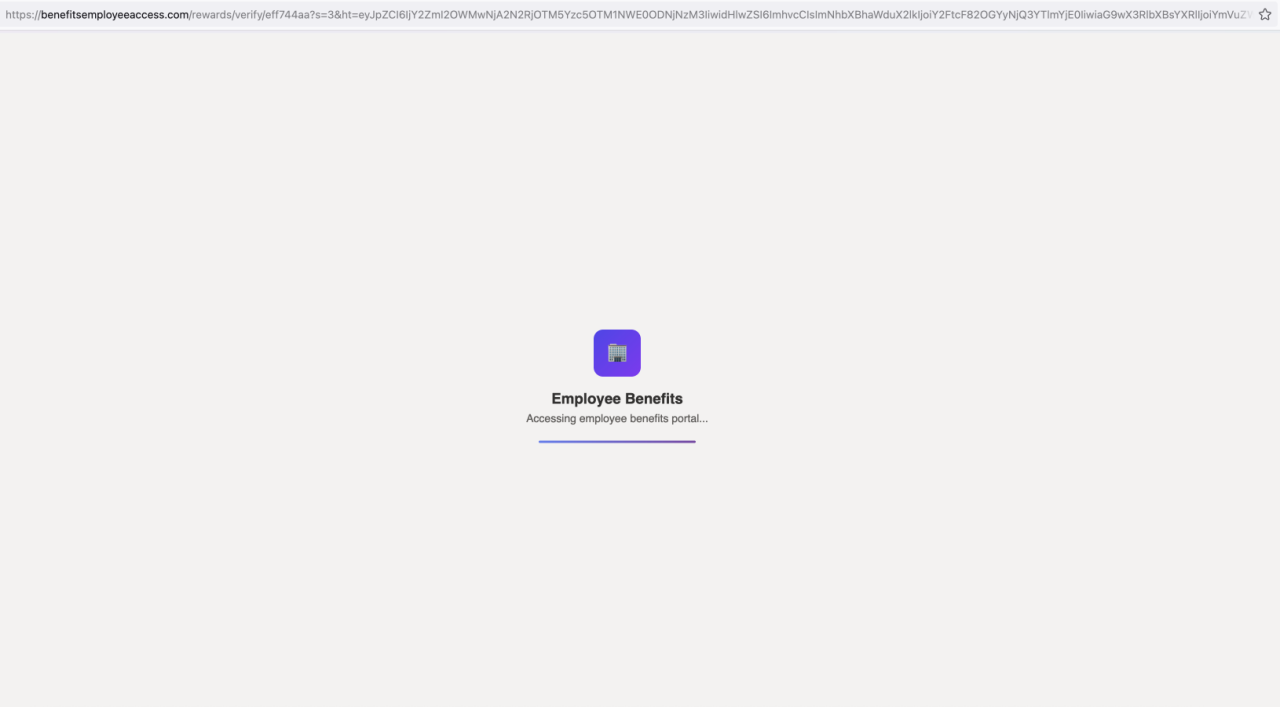 Figure 4. Phishing site simulates the loading of a page
Credential harvesting
After the splash screen, a targeted user is presented with the first-stage phishing page, which impersonates a Microsoft login and uses AitM to steal user credentials, and if the user authenticates successfully, any resulting tokens.
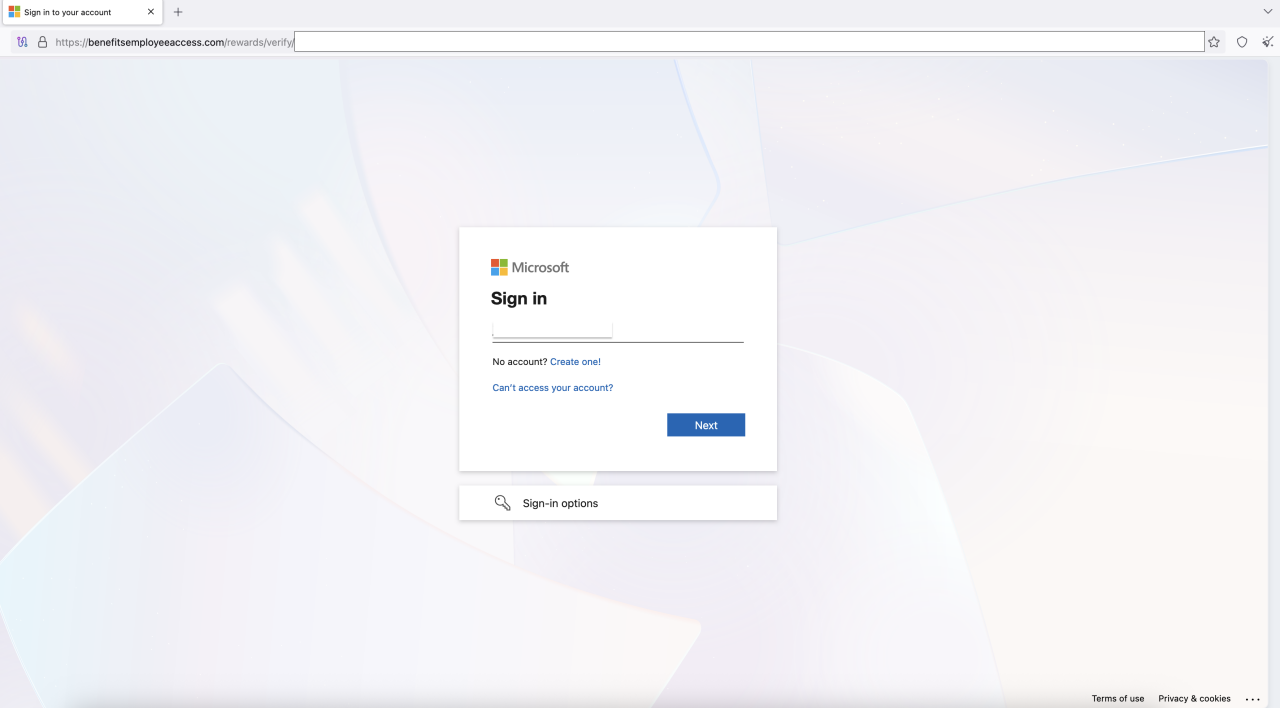 Figure 5. Fraudulent Microsoft login portal hosted on the phishing site
Second-stage redirection to Okta sign in
If the victim's email domain indicates that their organization uses Okta for identity federation, the phishing site's script intercepts the legitimate authentication flow. It dynamically replaces the legitimate Okta redirect URL with a malicious one (for example sso[.]oktacloud[.]io), sending the user to a look-alike Okta phishing page to again use AitM to harvest their SSO credentials and steal the resulting session cookie. We detail this technique in our code analysis, later in this report.
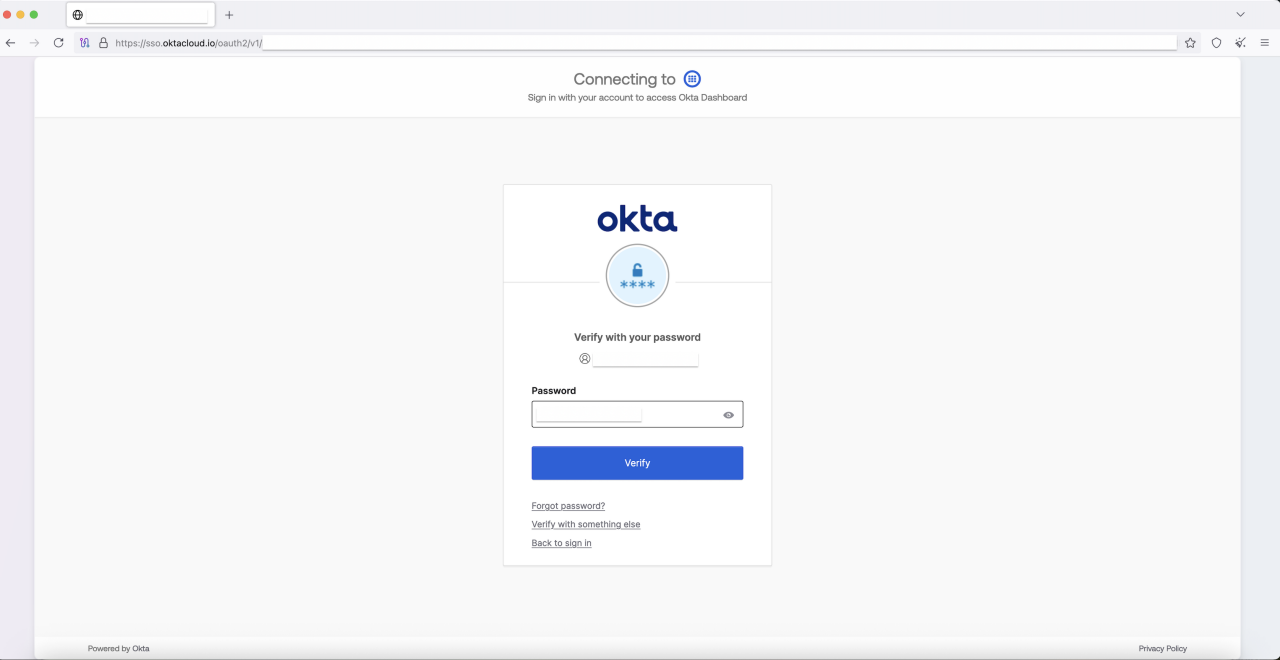 Figure 6. Redirection to fake Okta page where an account is federated
Original campaign infrastructure
Our analysis of the O-UNC-037 campaign identified the following infrastructure used to host the malicious fake Microsoft Sign-In pages:
benefitsemployeeaccess[.]com
benefitsquickaccess[.]com
benefitsworkspace[.]com
benefitscentralportal[.]com
benefitsselfservice[.]com
benefitsmemberportal[.]com
benefitsgatewayportal[.]com
benefitshubportal[.]com
benefitsadminportal[.]com
benefitsaccessportal[.]com
benefitsviewportal[.]com
The phishing sites use a number of URL paths to further the "employee benefits" lure:
/benefits/login/
/compensation/auth/
/rewards/verify/
/employee/access/
Federated users are redirected to the following second-stage landing pages after providing primary credentials for their Microsoft account.
sso[.]oktacloud[.]io
sso[.]okta-access[.]com
Internal-networks[.]com
Analysis of the Okta-targeting redirect phishing domains led us to multiple instances using Cloudflare Workers, which is a serverless platform often abused by threat actors to host and serve phishing sites.
sso[.]okta-proxy[.]workers[.]dev
okta[.]undermine[.]workers[.]dev
oktapage[.]oktamain[.]workers[.]dev
okta[.]eventspecial[.]workers[.]dev
Additional campaigns infrastructure
Pivoting from the O-UNC-037 phishing campaign, we discovered other campaigns using the same phishing kit and very similar lures. Observations of infrastructure detail in these other examples suggests it’s likely these are operated independently by other threat actors, possibly following the instructions of a shared or sold “method”. We include a list of these domains together with the O-UNC-037 domains in the Indicators of Compromise linked from the end of this document.
Phishing page analysis
This campaign follows a structured attack chain that combines social engineering and AitM techniques capable of stealing session tokens from both Microsoft 365 or Okta. Analysis of the phishing URLs and pages suggest that the actor is using a Phishing-as-a-Service (PhaaS) or a highly configurable phishing kit.
A detailed analysis of the phishing URLs reveal a gatekeeper mechanism embedded within its query parameters, particularly in the “ht” parameter, which contains a Base64-encoded JSON object.
https://benefitsemployeeaccess[.]com/rewards/verify/d582500e?s=3&ht=eyJpZCI6IjY2ZmI2OWMwNjA2N2RjOTM5Yzc5OTM1NWE0ODNjNzM3IiwidHlwZSI6ImhvcCIsImNhbXBhaWduX2lkIjoiY2FtcF82OGYyNjQ3YTlmYjE0IiwiaG9wX3RlbXBsYXRlIjoiYmVuZWZpdHMiLCJzdWNjZXNzX3RlbXBsYXRlIjoiYmVuZWZpdHNfZXJyb3IiLCJjcmVhdGVkIjoxNzYwOTM3NDcyLCJleHBpcmVzIjoxNzYwOTQ0NjcyLCJpcCI6IjExMy4yOS4yNDMuMSIsIm1heF91c2VzIjoxMDAwMDAwMCwidXNlcyI6MCwiaG9wX2NvdW50IjozLCJzZXNzaW9uIjoiZG9oNnBhbnE0Y3RhZTVsMjhvNWoyaTdoa3YifQ%3D%3D.bb0c9db57db67ff678edafb64f3cdc4fccfa93d4a8952e05ca2a3176e8134db5
When decoded, this object reveals a comprehensive set of data points for both tracking and access control. It contains detailed tracking information, including a "campaign_id", a "hop_template" for dynamic content loading, the victim "ip" address, and a unique "session" ID. Simultaneously, it includes the terms of access through link creation and expiration timestamps ("created", "expires") and usage counters ("uses", "max_uses"). This dual-purpose structure indicates a backend system that not only functions as a gatekeeper to enforce strict, time-limited access but also allows the actor to track individual campaigns, dynamically load different phishing templates, and monitor victim interactions. This capability enables the actor to easily adapt their lures and targets without redeploying the entire infrastructure.
{
"id": "66fb69c06067dc939c799355a483c737",
"type": "hop",
"campaign_id": "camp_68f2647a9fb14",
"hop_template": "benefits",
"success_template": "benefits_error",
"created": 1760973582,
"expires": 1760980782,
"ip": "█████",
"max_uses": 10000000,
"uses": 0,
"hop_count": 3,
"session": "qa061c1uiht26gmtqcj49fsgci"
}
Analysis of the initial Microsoft phishing page shows the handling of users from Okta-federated organizations. When such a user enters their email, a legitimate O365 login portal would typically return a JSON response containing a FederationRedirectUrl that points to the company's Okta tenant.
The campaign uses JavaScript on the phishing page to intercept this process. The script is configured to:
Monitor fetch responses from the server.
Inspect JSON responses for keys such as FederationRedirectUrl, AuthURL, or RedirectUrl.
Check if the URL points to a legitimate Okta tenant (.okta.com, .oktapreview.com, etc.).
If a legitimate Okta URL is found, the script dynamically replaces it with a URL pointing to the actor's malicious second-stage phishing domain, for example: sso[.]oktacloud[.].io.
The modified response is then passed back to the browser, seamlessly redirecting the user to the actor's fake Okta login page.
Captured credentials and session cookies are exfiltrated to a “/api” endpoint on the phishing server.
The script includes functions to auto-fill the username from the URL hash and auto-click "Next" and "Stay signed in" buttons, creating a more seamless and less suspicious experience for the victim.
This AitM interception allows the actor to hijack the authentication flow in real-time, presenting the user with a replica of Okta login page to capture SSO credentials and the established session cookie.
var _wd = "https://sso.oktacloud.io";
var _iO = function (u) {
if (typeof u !== "string") return false;
if (u.includes("sso.oktacloud.io")) return false;
if (u.includes("/app/office365")) return true;
if (u.match(/\.(okta|oktapreview|okta-emea)\.com/i)) return true;
if (u.match(/\/sso\/saml|\/sso\/wsfed|\/app\/[^\/]+\/sso/i)) return true;
return false;
};
Subsequent account takeover attempts
Following the successful compromise of credentials and session token theft, the threat actors have been observed attempting, and successfully authenticating from CloudFlare IPs (AS13335).
Threat Response
What we're doing
We’re actively engaged in the following activities to mitigate this threat:
Continuously monitoring for newly registered phishing domains and infrastructure associated with this campaign.
Proactively filing abuse reports with relevant registrars and hosting providers to initiate takedown requests for identified malicious sites.
Providing guidance and assistance to organizations to enhance the security of their Okta environments and investigate any suspicious activity related to potentially compromised accounts.
Protective Controls
Recommendations for customers
- Enroll users in strong authenticators such as Okta FastPass, FIDO2 WebAuthn and smart cards and enforce phishing resistance in policy.
- Okta app sign-on policies (formerly "authentication policies") can also be used to restrict access to user accounts based on a range of customer-configurable prerequisites. We recommend administrators restrict access to sensitive applications to devices that are managed by Endpoint Management tools and protected by endpoint security tools. For access to less sensitive applications, require registered devices (using Okta FastPass) that exhibit indicators of essential hygiene.
- Deny or require higher assurance for requests from rarely-used networks. With Okta Network Zones, access can be controlled by location, ASN (Autonomous System Number), IP, and IP-Type (which can identify known anonymizing proxies).
- Okta Behavior and Risk evaluations can be used to identify requests for access to applications that deviate from previously established patterns of user activity. Policies can be configured to step-up or deny requests using this context.
- Train users to identify indicators of suspicious emails, phishing sites and common social engineering techniques used by attackers. Make it easy for users to report potential issues by configuring End User Notifications and Suspicious Activity Reporting.
- Document, evangelize and adhere to a standardized process for validating the identity of remote users that contact IT support personnel, and vice versa.
- Take a "Zero Standing Privileges" approach to administrative access. Assign administrators Custom Admin Roles with the least permissions required for daily tasks, and require dual authorization for JIT (just-in-time) access to more privileged roles.
- Apply IP Session Binding to all administrative apps to prevent the replay of stolen administrative sessions.
- Enable Protected Actions to force re-authentication whenever an administrative user attempts to perform sensitive actions.
Observing and responding to phishing infrastructure:
- Review application logs (Okta logs, web proxies, email systems, DNS servers, firewalls) for any evidence of communication with any such suspicious domains.
- Monitor the domains regularly to see if the contents change.
If content hosted on the domain violates copyright or legal marks, consider providing evidence and issuing a takedown request with the domain registrar and/or web hosting provider.
Indicators of Compromise
The security contacts of Okta customers can sign-in and download Indicators of Compromise as a CSV file from security.okta.com at the following link:
https://security.okta.com/product/okta/phishing-campaigns-use-employee-benefits-lure-to-intercept-microsoft-and-okta-logins
A note on estimate language
Okta Threat Intelligence teams the following terms to express likelihood or probability as outlined in the US Office of the Director of National Intelligence Community Directive 203 - Analytic Standards.
| Likelihood | Almost no chance | Very unlikely | Unlikely | Roughly even chance | Likely | Very likely | Almost certain(ly) |
|---|---|---|---|---|---|---|---|
| Probability | Remote | Highly improbable | Improbable | Roughly even odds | Probable | Highly Probable | Nearly Certain |
| Percentage | 1-5% | 5-20% | 20-45% | 45-55% | 55-80% | 80-95% | 95-99% |


