


Executive Summary
Over the last 12 months, Okta Threat Intelligence has observed a growing number of attacks in which users are tricked into approving attacker-initiated MFA enrollments and password resets.
We have observed numerous related clusters of activity in which threat actors have tested, iterated on, and scaled these social engineering attacks.
One in five of the proactive notifications Okta sent to customers over the last month related to phishing domains that included the string “passkey”. The most recent campaign observed (O-UNC–066) used a passkey enrollment pretext to gain persistent access to Entra accounts.
Strengthening MFA enrollment and account recovery now needs to be a priority for every identity team, irrespective of platform or use case.
Threat Analysis
Until 2025, the largest share of social engineering activity we observed was impersonating IT support and other helpdesk staff to trick users into entering their password and OTP on attacker-controlled phishing sites.
This category of credential phishing is rendered ineffective when organizations require the use of phishing resistant authenticators in policy. Under phishing resistant policy conditions, even when a user is tricked into visiting an attacker-controlled site, the user is unable to share their access credentials.
Several clusters of threat activity have since adapted to their target’s adoption of phishing resistance by using methods of attack that bypass the need to steal and replay a user’s credentials.
The list of threat activity clusters below, presented chronologically from oldest to most recent, highlights some of these tactics.
Threat Actor | Targeted Process | TTPs |
|---|---|---|
Enrollment (passkey enrollment) | Attacker impersonates the security team of the targeted organization to drive users to a phishing page that encourages them to set up a passkey. | |
Recovery (password reset) | Attacker impersonates the employer's IT helpdesk, lures targets to a phishing page and/or to authorize an attacker-controlled application. | |
Enrollment | Attacker impersonates the employer’s IT helpdesk in voice calls to drive targets to credential phishing sites. | |
Recovery (password reset) | Attacker impersonates the employer’s IT helpdesk, and uses urgency around the need for a password reset as a pretext. | |
Enrollment (passkey enrollment) | Attacker impersonates the employer’s IT team in voice calls to drive targets to credential phishing sites, uses stolen credentials to enroll an attacker-controlled passkey in the user’s account. | |
Recovery (password reset) | Attacker simultaneously triggers the "forgot password" flow while on the call, socially engineers the user into approving the reset |
Notably, we have yet to observe the threat actor Okta tracks as O-UNC-067 using credential phishing kits in order to take over accounts.
This intrusion actor, active since at least June 2026, selectively targets organizations configured to allow self-service password reset (SSPR).
The threat actor first performs reconnaissance on targets to assess whether a link to trigger a password reset is accessible, and to determine what MFA challenges apply to verify the user’s identity when this password reset is triggered. If a SSPR option is enabled and the user is able to verify their identity during that flow using MFA factors that are not phishing resistant, the attacker calls their target while simultaneously triggering the password reset flow.
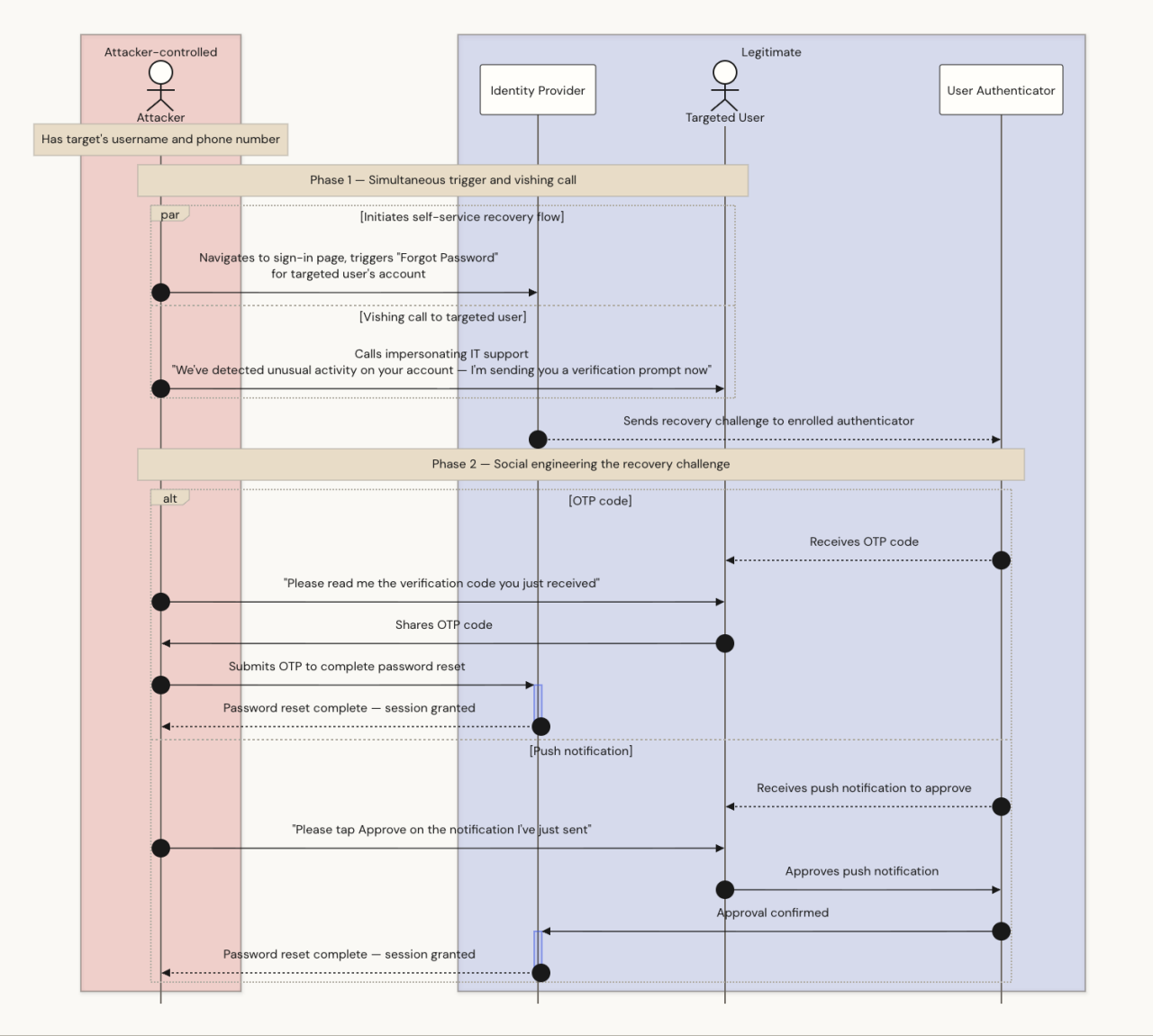 Figure 2: Abuse of self-service recovery
Breaking down the account recovery process
Minimum viable defense
Irrespective of whether a social engineering campaign targets authenticator enrollment (e.g., O-UNC-066) or targets authenticator recovery (e.g., O-UNC-067), the success or failure of the attack hinges on the target’s org-level account management policies.
In the weakest account management configuration:
A password reset link is available on a public sign-in page
MFA enrollment policies allow verification of the user’s identity via any MFA factor
MFA enrollment policies allow verification from any IP address
This configuration may be appropriate for some customer identity use cases, but less so for workforce customers. An attacker that has engaged a targeted user on the phone can trigger the password reset from their device while convincing the user to share an OTP or accept a push request to approve the reset event.
Okta administrators can very easily add friction directly in the MFA enrollment policy by:
Requiring additional verification (beyond a single factor challenge) to initiate the reset, and
Restricting the ability to use self-service features to trusted IP ranges.
This adds friction that prevents opportunistic attacks, but would not withstand a determined adversary. A social engineering actor that triggers the self-service event is in a position to select from a list of available verification challenges during recovery, and will always choose the weakest, most “phishable” method of authentication.
That’s why every Okta customer should be taking a close look at Okta account management policies.
Applying phishing resistance to authenticator enrollment
Okta account management policies (AMPs) were originally introduced to support the authenticator lifecycle requirements of organizations that use passwordless authentication. Increasingly, these policies should also be viewed as a configuration tool that protects all authenticator enrollment and recovery flows from social engineering attacks.
AMPs offer administrators the same rich set of policy constraints to account recovery that were previously only available to authentication. AMPs can be used to require verification using phishing resistant factors, managed devices, trusted networks or a range of other criteria, effectively applying “zero trust” to the account recovery process.
Okta Threat Intelligence recommends the use of Okta account management policies to apply phishing resistance to authenticator enrollment and recovery. AMPs can require a user to verify their identity using a phishing resistant authenticator before they add or modify an authenticator.
In the strongest account management configuration available, user accounts are bootstrapped using pre-registered physical security keys, and the account management policy always requires that the user verifies their identity using a phishing resistant factor before they can add or modify an authenticator. This neutralizes attacks on both authenticator enrollment and recovery. Where (rare) edge cases emerge, Okta integrates with identity verification services that require a user to provide a government-issued ID and satisfy a liveness check to initiate recovery.
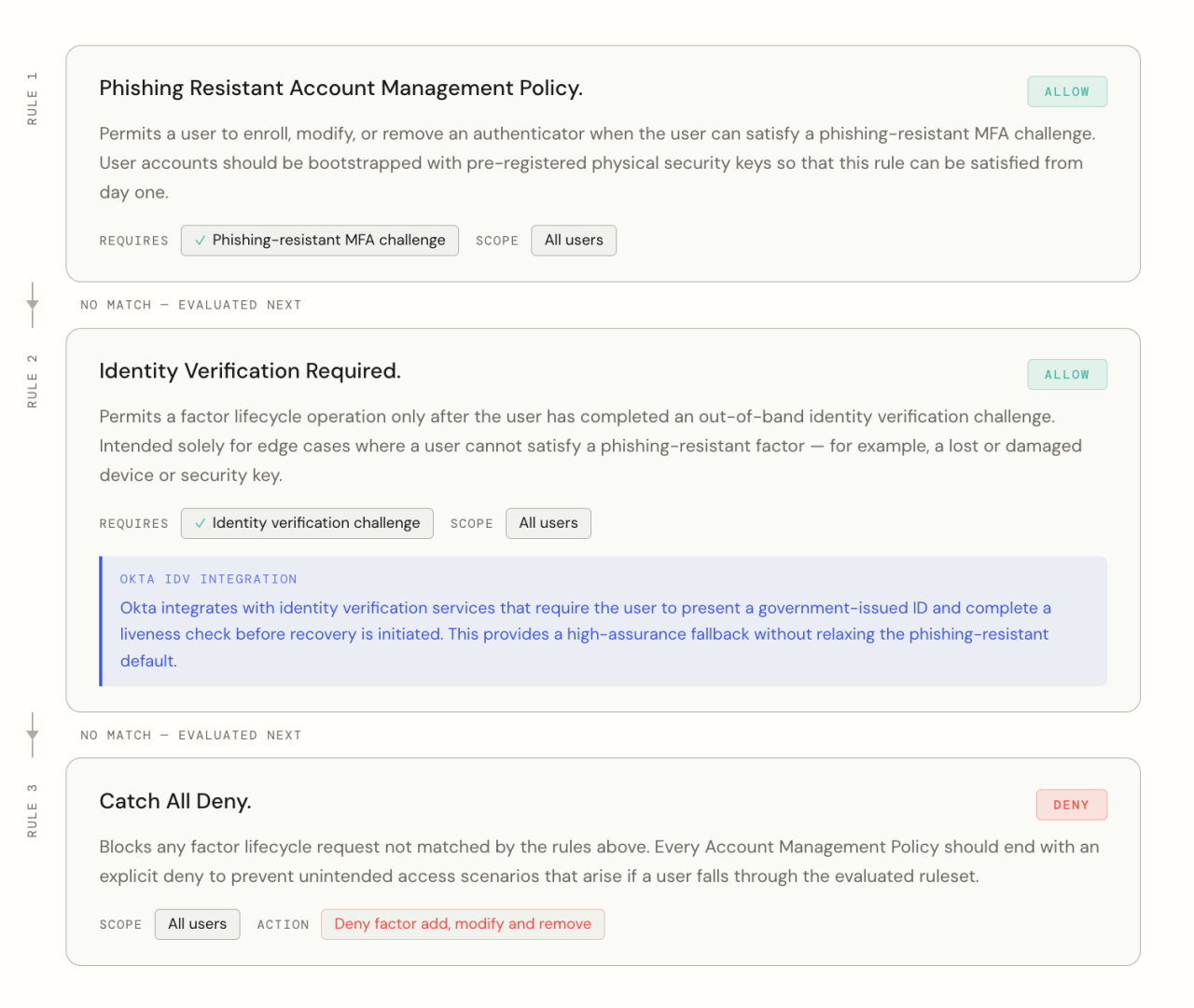 Figure 3: A phishing-resistant account management policy rule stack
The next strongest approach is to use Okta AMPs, groups and event hooks to gradually raise the enrollment assurance bar for workforce users that are not already enrolled in a sufficient number of phishing resistant authenticators.
Under such a scenario, the top (first evaluated) AMP rule might allow a user to add or modify a factor if the request comes from a managed device and the user satisfies a phishing-resistant MFA challenge. The aim should be for all users to progressively be added to the group in scope for this rule and subsequently be constrained to only using phishing resistant factors during factor lifecycle events. Users that trigger policy rules beneath it should be prioritized for migration.
The next rule might constrain a user in whatever way possible until the user has enrolled in a sufficient number of phishing resistant authenticators. Users may be required to satisfy an Identity Verification (IdV) challenge, for example, or be temporarily allowed to verify their identity using weaker authenticators for their first few days of onboarding if they enroll from a trusted network. Event hooks or Okta Workflows can also be used to automatically advance users into groups with stronger assurance requirements as they meet the necessary criteria.
Always remember to add a catch-all deny as the final (bottom) rule in any policy, to prevent any unintended access scenarios.
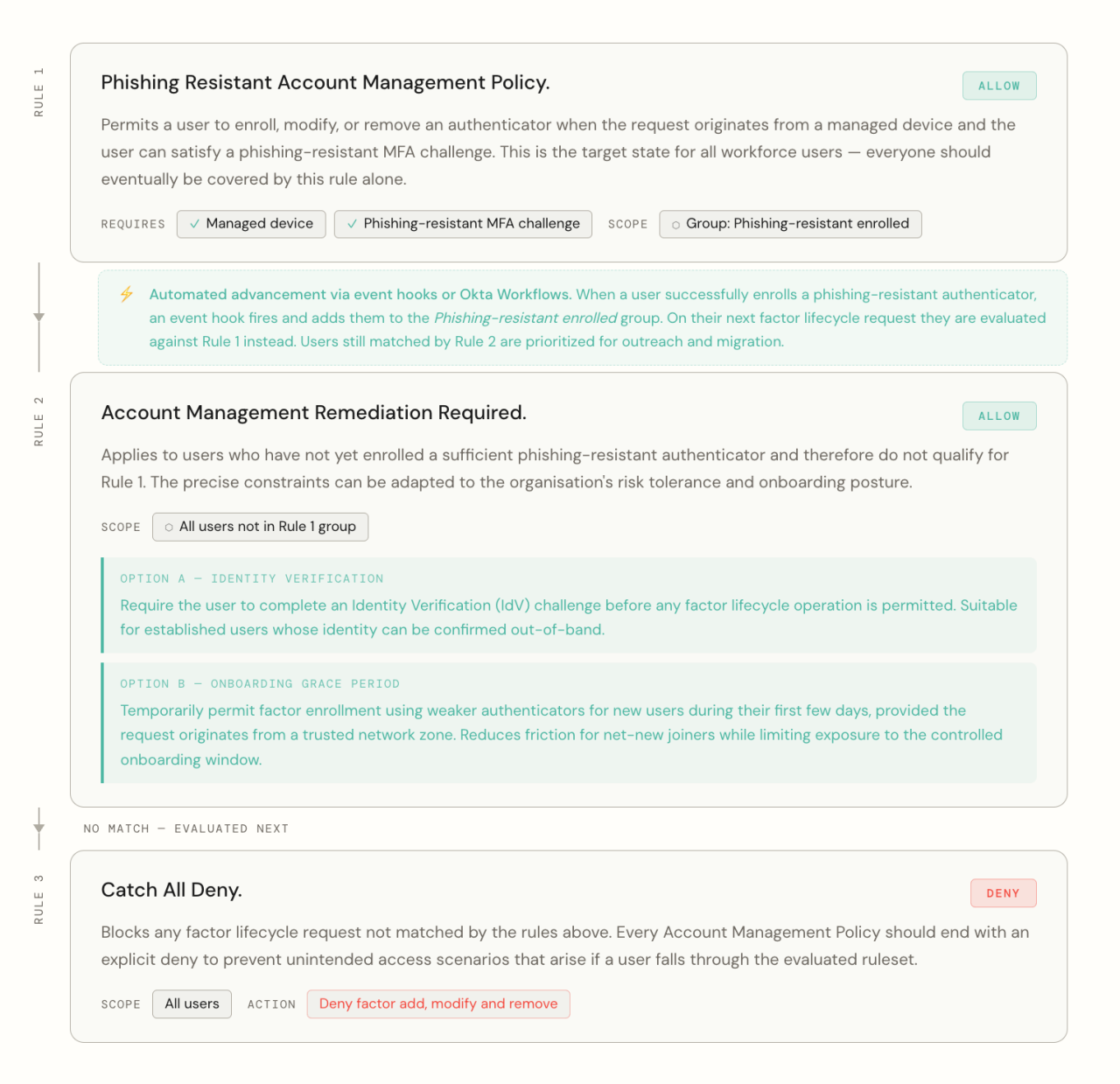 Figure 4: A progressive approach to account management policy
Applying phishing resistance to authenticator recovery
The key to phishing resistant recovery is to enroll users in a sufficient number of phishing resistant authenticators to account for any loss or disruption of a single device.
One of the greatest strengths of the Okta Verify client is that there is zero marginal cost for a user to enroll multiple devices in their Okta Verify account. A user can enroll from their managed laptop and smartphone, for example.
When every workforce user is enrolled in multiple phishing resistant factors (Okta Verify installs) across more than one device, the number of account recovery events that require the helpdesk falls considerably. If a user loses a device or if the device is unresponsive, they will still have strong, phishing-resistant authenticators enrolled on a second device (e.g., smartphone vs laptop) or via an external security key which they can use to enroll a new or replacement device.
Subsequently there is no need to include a “forgot password” link on the sign-in page, and there is no need to offer weaker account management policies.
Indicators
Indicators associated with the clusters of activity discussed above are all available to the security contacts of Okta customers at:
https://security.okta.com/?product=oktathreatintelligence
Recommendations
ATT&CK technique | Tactic | Control |
|---|---|---|
T1590 / T1591 | Reconnaissance | Restrict recovery operations for workforce users to behind authenticated user settings. If a workforce organization is configured to support self-service recovery (the "forgot password" flow), consider restricting the IP range from which the sign-in page can be accessed to a known or trusted network using Okta network zones. |
T1583 / T1584 | Resource Development | Deny requests from known anonymizing services and proxies using enhanced dynamic zones. |
T1566 / T1598 | Phishing / Vishing | Enroll users in strong authenticators such as Okta FastPass, passkeys or smart cards and enforce phishing resistance in policy. Establish, communicate and evangelise methods of verifying the identity of helpdesk personnel when they contact users. Apply Okta account management policies that constrain the ability to modify authenticators. Apply temporary access codes as a preferred method for recovering access after identity verification. |
T1078 | Valid Accounts (Initial Access) | Okta authentication policies can be used to restrict access to user accounts based on a range of customer-configurable prerequisites. We recommend administrators restrict access to sensitive applications to devices that are managed by Endpoint Management tools and protected by endpoint security tools. |
T1621 | MFA Request Generation | Enroll users in strong authenticators such as Okta FastPass, FIDO2 WebAuthn, and smart cards and enforce phishing resistance in policy. |
T1098.005 | Account Manipulation — Device Registration | Apply Okta account management policies that constrain the ability to modify authenticators. |
Nick Connolly contributed to this article.


