




Executive summary: How Okta satisfies CMMC 2.0 Access Control requirements
Okta enables defense industrial base contractors to meet CMMC 2.0 Access Control (AC) requirements by serving as a centralized, identity-centric policy enforcement point. Through attribute-based access control, context-aware MFA, and real-time session evaluation using the Shared Signals Framework, Okta automates least-privilege enforcement across CMMC Levels 1 through 3 to safeguard CUI.
This is the third and final blog post in our three-part series on the role of identity in the Department of Defense (DoD) Cybersecurity Maturity Model Certification (CMMC) 2.0 framework. If you missed them, be sure to read the first two:
- How Okta can help organizations meet CMMC 2.0 Identification and Authentication requirements
- How Okta can help meet CMMC 2.0 Audit and Accountability requirements
After you have verified who a user is (Part 1: Identification and Authentication) and established the mechanisms to trace their actions (Part 2: Audit and Accountability), you face the next critical cybersecurity mandate: What are they actually allowed to do?
The Access Control domain: The enforcer of least privilege
The Access Control (AC) domain is the operational enforcer of the principle of least privilege. It restricts user access to only the specific resources, systems, and directories necessary for each role, preventing lateral movement and unauthorized exposure of controlled unclassified information (CUI).
Like the Identification and Authentication (IA) and Audit and Accountability (AU) domains, the CMMC 2.0 scoring methodology places a premium on Access Control, dedicating several high-value “big rock” controls to it, each individually weighted at 5 points. Failing to satisfy a single five-point control results in an immediate audit failure.
In this post, we will demonstrate how Okta enables defense contractors to enforce context-aware access boundaries across all CMMC tiers.
CMMC 2.0 Access Control mapping: Level 1 to Level 3
| CMMC level | Control ID | Requirement summary | Core Okta enabler | Auditor evidence |
|---|---|---|---|---|
| Level 1 | AC.L1-3.1.1 (NIST 800-53 / AC-2, AC-3) | Restrict system access strictly to authorized users, processes, and devices. | Okta Universal Directory and SSO: Centralized identity source, automated SCIM lifecycle management, and SAML/OIDC enforcement. | HR-to-Okta directory sync mapping; application assignment lists; blocked login trace test for disabled accounts. |
| Level 2 | AC.L2-3.1.12 (NIST 800-53 3.1.12 / AC-17) | Authorize, document, monitor, and control all remote connections to systems housing CUI. | Adaptive MFA and Device Assurance: Contextual risk evaluation (geofencing, IP reputation) and endpoint posture verification. | Geofencing exclusion rules; live access denial test on an unencrypted device; System Log metadata export. |
| Level 3 | AC.L3-3.1.23 (NIST 800-53 / AC-3(1), AC-16) | Enforce dynamic, runtime access policies that adapt to changes in user and environment risk. | Identity Threat Protection and Universal Logout: SSF-based telemetry streaming with EDR/SASE partners to terminate active sessions. | Continuous session risk policies; automated Universal Logout revocation demo across SaaS apps; threat remediation logs. |
How to meet CMMC Level 1: Limiting system access
Level 1 establishes basic cybersecurity hygiene for organizations handling federal contract information (FCI). It focuses on ensuring that system access is strictly limited to authorized personnel, preventing unauthorized or unverified sign-ins.
| Key Level 1 control | Requirement | Correlated NIST SP 800-53 controls |
|---|---|---|
| AC.L1-3.1.1: Limit Information System Access | Limit information system access to authorized users, processes acting on behalf of authorized users, or devices (including other information systems). | AC-2: Account Management AC-3: Access Enforcement |
Technical implementation with Okta
- Unified control plane: Okta Universal Directory acts as a single, centralized source of truth. This eliminates uncoordinated administrative directories and prevents the creation of orphaned, shared, or unmonitored team accounts.
- Enforced single sign-on (SSO) federation: By federating all company and project applications using SAML 2.0 or OpenID Connect (OIDC), you ensure that access rules are systematically enforced at the portal level.
- Attribute-based group assignments: Okta dynamic groups automatically calculate application assignments based on real-time metadata, such as job code, citizenship status, and department. If a user’s department change is registered in your HR system, Okta immediately revokes access to non-essential applications, dynamically enforcing least privilege.
Certified Third-Party Assessment Organization (C3PAO) assessment evidence checklist
- Show directory integration: Demonstrate how Okta integrates with your HR or Active Directory root of trust, illustrating how active profiles map to single individuals.
- Review application assignees: Display the Okta Admin Console for a target application, showing that only members of specific, authorized groups are assigned.
- Execute a blocked login test: Attempt to sign in to a federated application using an unassigned or suspended user account, demonstrating the immediate access rejection.
How to meet CMMC Level 2: Gating and monitoring remote access
At Level 2, organizations handling CUI must implement dynamic, context-aware network boundaries. In a hybrid or remote-work world, static firewalls are obsolete; identity serves as the new perimeter.
| Key Level 2 control | Requirement | Correlated NIST SP 800-53 control |
|---|---|---|
| AC.L2-3.1.12: Monitor and Control Remote Access | Document, monitor, and control systematic remote access to the information system. | AC-17: Remote Access |
Technical implementation with Okta
- Contextual sign-on policies: Okta Adaptive Multi-Factor Authentication (MFA) analyzes risk variables before authorizing any remote session. These rules can be configured to verify IP reputation, geolocation (such as blocking all connections originating outside the US), and device management status.
- Okta Device Assurance: Okta Verify checks the remote device’s local security posture—confirming that disk encryption is enabled, a passcode is set, and a firewall is active—before permitting authentication.
- Okta Access Gateway: For legacy on-premises applications, Okta Access Gateway extends cloud-native identity policies, device verification, and MFA checks to on-premises resources, eliminating the risk of unmonitored inbound VPN connections.
C3PAO assessment evidence checklist
- Walk through geofencing policies: Show your Okta network zone configuration, illustrating that connections from non-approved countries or high-risk ISPs are systematically blocked.
- Demonstrate device posture verification: Walk the auditor through a live sign-on policy requiring a compliant device state. Attempt to sign in from an unmanaged, unencrypted laptop to demonstrate the immediate, policy-driven block.
- Provide metadata-rich session logs: Export an event entry from the Okta System Log showing the rich device telemetry collected during a remote connection (device OS, browser, IP address, and security posture).
How to meet CMMC Level 3: Real-Time, dynamic session evaluation
At the advanced tier, defense contractors dealing with critical DoD programs must defend against highly sophisticated advanced persistent threats. Access decisions cannot be static, point-in-time checks; they must adapt dynamically to changes in risk throughout the session.
| Key Level 3 control | Requirement | Correlated NIST SP 800-53 controls |
|---|---|---|
| AC.L3-3.1.23: Employ Dynamic Access Control | Employ dynamic access control (e.g., policy decision-making based on runtime attributes of the subject, resource, and environment). | AC-3(1): Restricted Access AC-16: Security Attributes |
Technical implementation with Okta
- Okta Identity Threat Protection: Identity Threat Protection continuously evaluates session risk after the initial sign-in. Using the Shared Signals Framework (SSF), Okta communicates with your endpoint detection and response (EDR) solutions and secure web gateways (SASE).
- Continuous session evaluation: If your EDR agent logs a security compromise on a user’s device, or if the user switches from a secure corporate network to a public network, Okta immediately intercepts the event telemetry.
- Dynamic Universal Logout: Upon detecting a high-risk change in security attributes, Okta Identity Threat Protection triggers an automated Universal Logout command. This terminates the user’s active session not only in Okta, but also across all integrated SaaS applications, such as Microsoft 365, AWS, and Slack, within seconds, containing the threat and preventing lateral movement.
C3PAO assessment evidence checklist
- Review Identity Threat Protection policies: Walk the assessor through your Okta Identity Threat Protection configurations, showing how external security signals are linked via SSF.
- Perform a session revocation demo: Sign in successfully on a compliant workstation. Simulate a threat state (such as blocking the EDR agent or changing networks). Show the assessor how Okta instantly revokes the active sessions across all applications.
- Audit the remediation logs: Present System Log entries showing the dynamic trigger, the risk recalculation, and the execution of the dynamic logout command.
Securing the defense industrial base
Across this three-part series, we have defined a complete identity-first approach to CMMC 2.0.
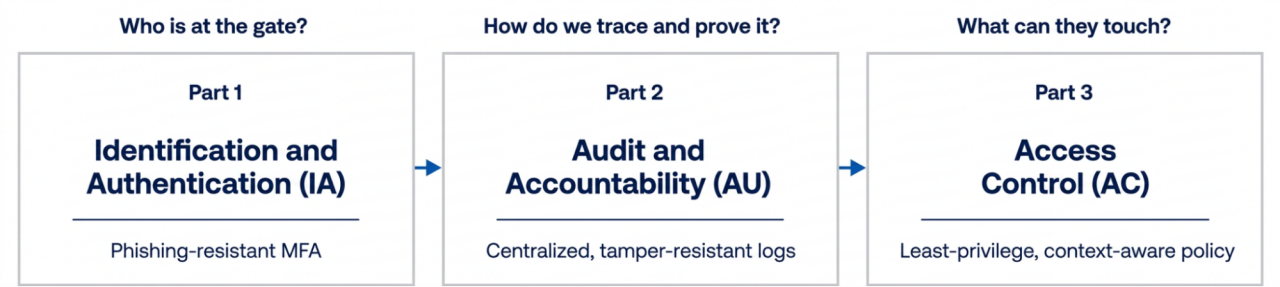 Figure 1. An identity-first approach to CMMC 2.0 across the three-part series
By standardizing your security posture on Okta for Government (Moderate or High), you can confidently satisfy up to 25% of the 110 CMMC Level 2 controls out of the box. Centralizing your identity control plane not only secures your critical project environments and protects CUI, but also reduces your audit preparation overhead, helping you maintain a seamless, secure, and compliant path forward.
Ready to modernize your identity perimeter?
Reach out to our federal solutions team or consult the Okta CMMC Discovery Guide for best practices and pitfalls to avoid, as well as more information about how Okta’s solutions map to CMMC 2.0 requirements.


